
Help › Getting started
Training paths
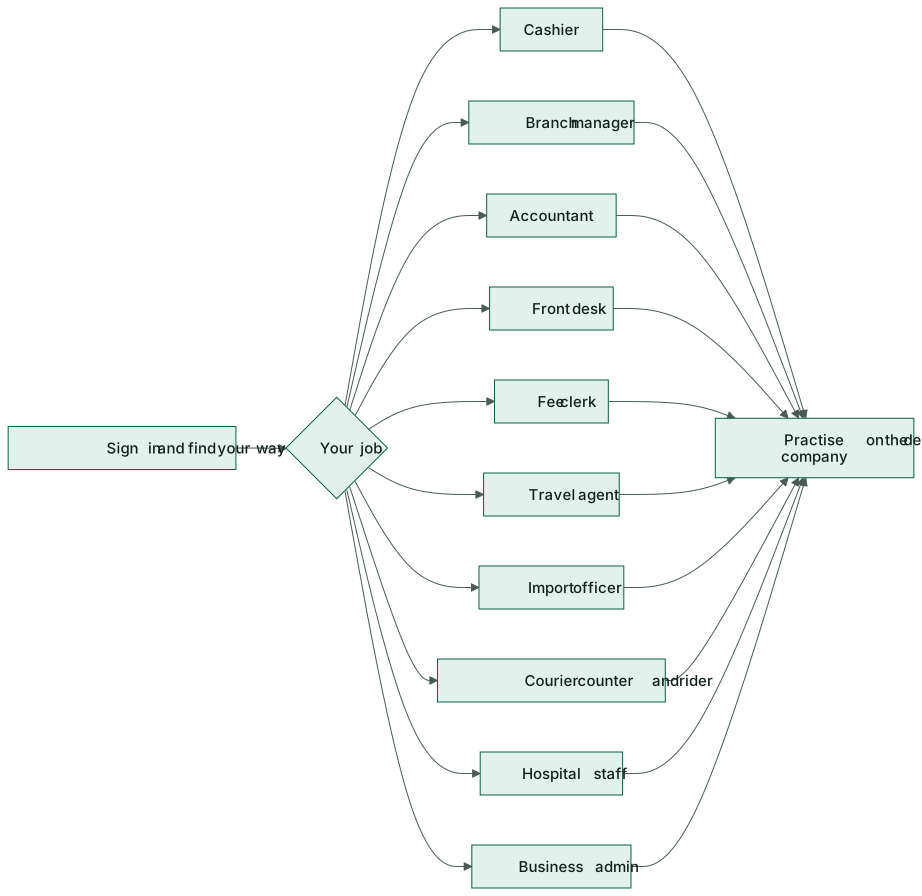
A short checklist for each job — cashier, branch manager, accountant, front desk, fee clerk, travel agent, import officer, courier counter and rider, hospital staff and business admin — with the pages and videos to go through.
New to Hayat? Find your job below and work down the list. Each path takes 30–60 minutes: watch the videos, read the linked sections, then practise on the demo company (ask your administrator — nothing you do there touches real books).
Every path starts with:
- Sign in and find your way around and the video Sign in and find your way around.
- Install your phone app from Mobile apps, if your job has one.
▶Sign in and find your way around0:47
Who does what
| Job | Main site | Phone app |
|---|---|---|
| Cashier | hayaterp.com/pos | Hayat Lite (small shops) |
| Branch manager | hayaterp.com | Hayat Manager, Hayat Stock |
| Accountant | hayaterp.com | Hayat Manager |
| Hotel front desk | hotel.hayaterp.com | Hayat Hotel |
| School fee clerk | school.hayaterp.com | Hayat School |
| Travel agent | travel.hayaterp.com | Hayat Travel |
| Import officer | trade.hayaterp.com | Hayat Trade |
| Courier counter and rider | shipping.hayaterp.com | Hayat Shipping |
| Hospital reception, doctor, nurse | hospital.hayaterp.com | Hayat Hospital |
| Business admin | hayaterp.com (and each workspace site) | Hayat Manager |
Cashier
- Open a shift and count the float.
- Make a sale: scan, change a line, take cash and card, print.
- Promotions, coupons and the total: type a coupon, read ✔ / ✕.
- Loyalty points: find a member, pay with points.
- Bank card offers: first 6 + last 4, Offer?, charge the amount shown.
- Store and gift cards and discount reasons.
- Hold several bills, returns and exchanges.
- Close the shift and print the Z report.
▶Make a sale on the POS0:36
▶Till: member, coupon, points and bank card offer0:55
Branch manager
- The branch and inventory dashboards.
- Approve discounts and refunds at the till with your PIN.
- Shifts and cash-up: reconcile every till.
- Stock, transfers and counts; receive goods.
- Enrol loyalty members and sell gift cards.
- Check the discount report every week.
▶Add an item and check stock0:33
▶Loyalty: programme, members and points0:38
▶Store and gift cards0:32
▶Discount report, log and rules0:45
Accountant
- How every module reaches the accounts — read it all.
- Accounts and financial statements: journals, bank reconciliation, statements.
- Card settlements: record each machine's daily deposit; clear Days not settled.
- Bank claims: claim the banks' share monthly and record their payments.
- Discount report and loyalty liability (points and store-card balances).
- Tax and FBR.
▶Accounts and financial statements0:30
▶Bank offers, claims and card settlements0:52
▶Discount report, log and rules0:45
Hotel front desk
- The room rack and front desk lists.
- Make a booking and take an advance.
- Check in and print the registration card.
- The folio: charges, payments, discount or promo code, points and store cards.
- Check out with split payment or bill to company.
▶Hotel: room rack, check-in and the folio0:50
School fee clerk
- Fee structure of your classes (read only).
- Generate vouchers for the month and print them.
- Collect fee: find the student, receive, print the receipt; advances.
- Late fees and the defaulters list.
- The fee collection report at day end.
▶School: fee vouchers and collecting fees0:57
▶School: attendance and the timetable0:51
Travel agent
- Make a booking: customer, passengers, services.
- Confirm, invoice and take payment, including points and card offers.
- Visa tracker and passports with us.
- Umrah and Hajj groups.
- Trips and seats if you also sell bus seats.
▶Travel: a booking file from quote to invoice0:54
Import officer
- Contracts and proformas.
- Letters of credit: open, margin, amend, retire.
- Shipments and their documents.
- Customs clearance and landed cost; the duty calculator.
▶Import & export: LC, shipment, clearance and proceeds0:48
Courier counter and rider
- Booking counter: book a parcel and print the label.
- Pickups for merchants.
- Hub scans, runsheets and delivery.
- Riders: open your runsheet in Hayat Shipping, scan each parcel, record delivery or the failed reason and the COD; hand over the cash at closing.
- COD and merchant billing (counter supervisors).
▶Courier: book a parcel, runsheets and COD0:39
Hospital reception, doctor and nurse
- Reception: register a patient, give an OPD token, billing and points, store cards and card offers.
- Doctors: the OPD consultation, IPD rounds, theatre cases.
- Nurses: vitals and nursing notes in IPD.
- ER staff: register an arrival and triage, treat and close.
- Radiology and blood bank staff: Radiology, Blood bank.
▶Hospital: register, OPD, lab and pharmacy0:47
▶Hospital: emergency, theatre, radiology and blood bank0:42
Business admin
- Modules and access: what your business has and how roles work.
- Add users and give roles; set discount limits and PINs.
- Discount reasons and rules and promotions.
- The loyalty programme, banks and offers, card machines.
- The setup of each workspace you run: school, hotel, shipping, trade.
- How every module reaches the accounts.
▶Users, roles and company settings0:36
▶Loyalty: programme, members and points0:38
Workflow
Where the money goes
Whatever your job, what you record posts to the accounts straight away — so take care with amounts and payment methods, and use the right discount reason. Accountants see it all in How every module reaches the accounts.