
Data integrity: reconciliations and exceptions
hayaterp.com/integrity ↗Eight reconciliations that prove the books agree (POS, POS to accounts, stock roll-forward, stock to accounts, supplier and customer ledgers, bank and cash), 24 exception rules for duplicates, gaps, unbalanced journals, negative stock and suspicious till activity, the nightly run, thresholds, and the exception workflow from investigation to approved resolution.
Data integrity checks that what the business recorded and what the books say are the same, every night, and turns every difference into an exception someone must explain. It is the auditor's and the accountant's control screen: reconciliations show whether things agree, exceptions say what does not, and every exception keeps an audit trail until its resolution is approved.
Who does what
| Permission | Ready-made roles | Can do |
|---|---|---|
| See reconciliations and exceptions (recon.view) | Accountant, Branch Manager, Auditor, Management | Open the dashboard, exceptions and reconciliation runs. |
| Run reconciliations (recon.run) | Accountant, Auditor | Run a reconciliation and Scan for exceptions for a period. |
| Investigate and resolve exceptions (recon.resolve) | Accountant, Auditor | Assign, add notes, resolve and send for approval, dismiss. |
| Approve exception resolutions (recon.approve) | Management | Approve or reject a resolution (in Approvals), Re-open a closed exception. |
Saving the Thresholds needs Company, branch and system settings (admin.settings). Whoever resolves an exception can never approve it.
The dashboard
Data integrity → Data integrity shows a card per reconciliation with its last result — Balanced (green) or Differences (red), how many differences and when it ran — and a Run button. Below: open exceptions by status (click to open the list), Overdue, by category with the amount involved, by age and by severity.
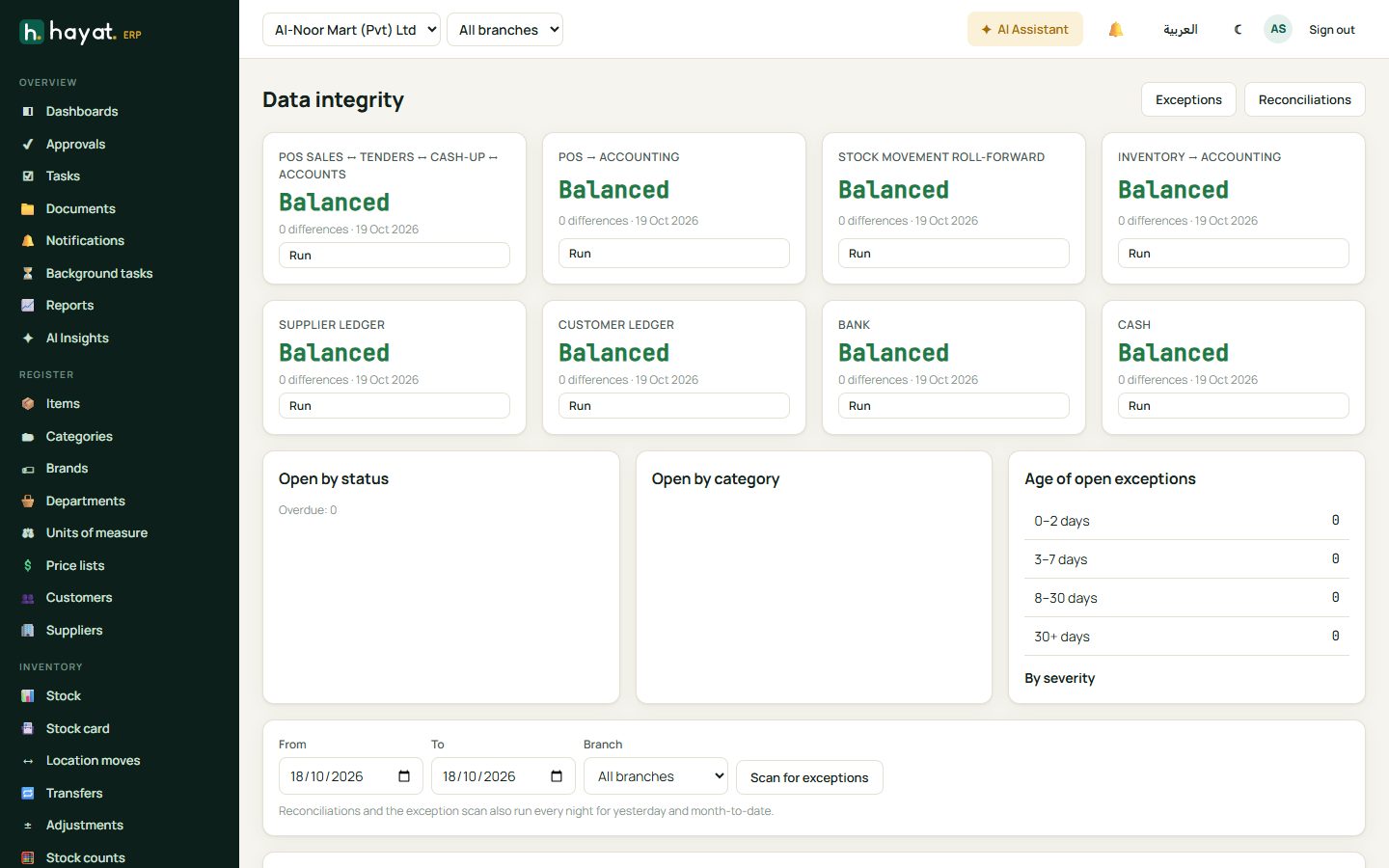
| Reconciliation | Checks | Nightly period |
|---|---|---|
| POS sales ↔ tenders ↔ cash-up ↔ accounts | Per branch per day: receipts, the tenders taken, the cash declared at cash-up and what was posted. | Yesterday |
| POS → accounting | Every POS receipt posted, with tender amounts equal to the journal. | Yesterday |
| Stock movement roll-forward | Opening + purchases ± transfers − sales ± adjustments = closing, per item. | Month to date |
| Inventory → accounting | Stock valuation and goods in transit against the general ledger. | Month to date |
| Supplier ledger | Supplier balances against the accounts payable control account. | Month to date |
| Customer ledger | Customer balances against the receivables control account. | Month to date |
| Bank | Bank statements against the ledger, with unmatched items. | Month to date |
| Cash | Petty cash funds, till over / short and cash in transit. | Yesterday |
Run a check yourself
The bar under the dashboard (Run reconciliations) has From, To (yesterday by default) and Branch. Pick the period, then click Run on a reconciliation card: the result says Balanced or Differences — n differences, n new exceptions. Scan for exceptions runs all the exception rules for the period.
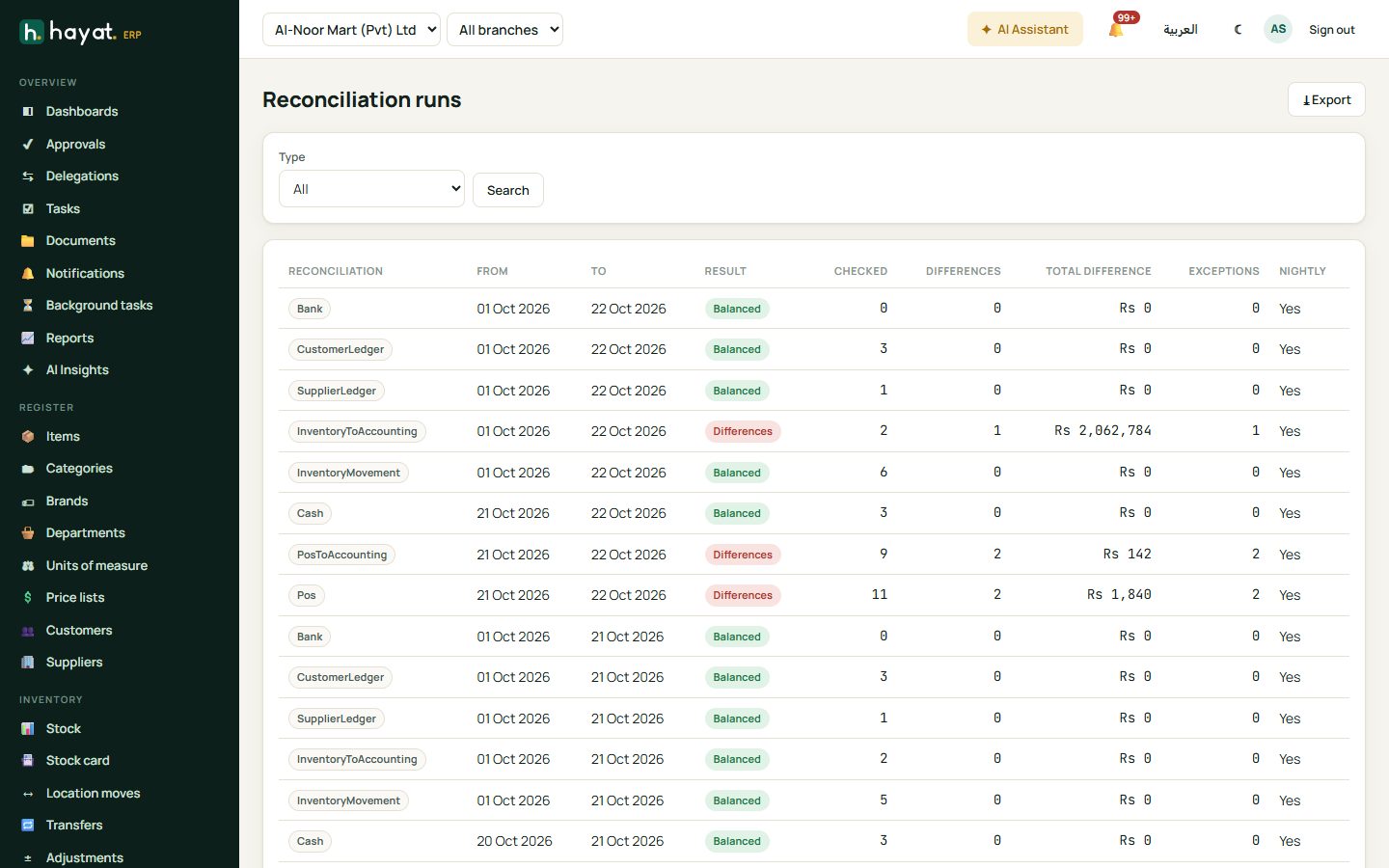
Reconciliations lists every run (filter by type) with the period, result, lines checked, differences, total difference, exceptions raised and whether it was the nightly run. Open one to see each line — expected, actual and the difference — with the totals (Σ) in bold; click a line to open the record behind it.
The nightly run
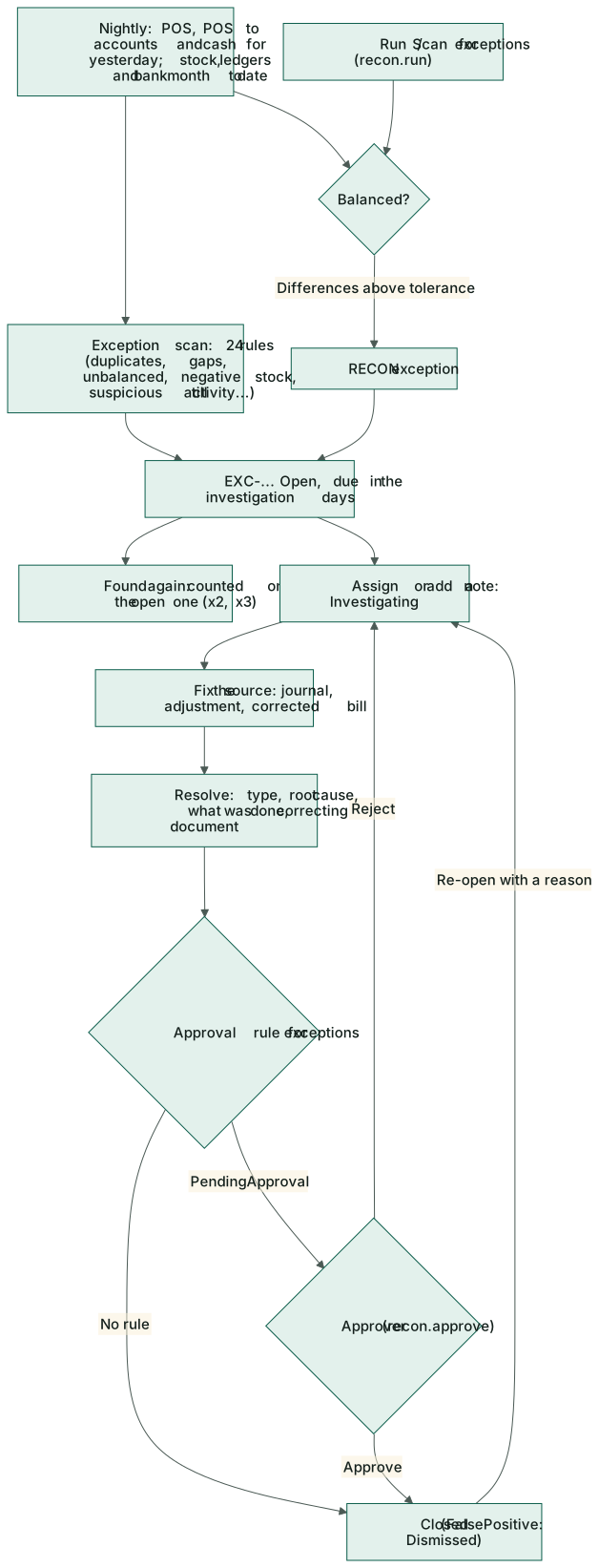
Every night, for each company whose Run nightly reconciliations and scan is ticked, Hayat runs the POS, POS-to-accounting and cash reconciliations for yesterday, the stock, ledger and bank reconciliations for the month to date, then scans yesterday for exceptions. A reconciliation with differences above the tolerance raises RECON exceptions. People who may resolve exceptions get one notification per branch: n new integrity exception(s), critical when any is high or critical.
Thresholds
Thresholds (per company, at the bottom of the dashboard) tune the rules: Rounding tolerance, Cashier over/short limit, Large adjustment value, Large manual journal, High discount %, Max voids per cashier/day, Max no-sale drawer opens/shift, Business opens and Business closes, Unbilled GRN after (days), Unmatched bank line after (days), Investigation due in (days) (the due date of new exceptions) and the nightly switch. Save.
The exception rules
| Rule | Category | Raised when |
|---|---|---|
| DUP-BILL | Duplicate | The same supplier invoice number is posted more than once. |
| DUP-SPAY | Duplicate | A supplier is paid the same amount twice on the same day. |
| DUP-RCPT | Duplicate | A customer receipt is recorded twice (same customer, amount, date and reference). |
| DUP-JV | Duplicate | A manual journal is duplicated (same date, reference and amount). |
| MISS-POSJV | Missing | A completed POS receipt has no posted journal. |
| MISS-SEQ | Missing | There is a gap in POS receipt numbering. |
| MISS-BILL | UnmatchedInvoice | Goods were received but not billed by the supplier after the allowed days. |
| MATCH-BILL | UnmatchedInvoice | A supplier bill does not match the order and receipt (three-way match). |
| UNB-JV | Unbalanced | A posted journal's debits and credits differ (always critical). |
| NEG-STOCK | NegativeStock | An item has negative stock at a location. |
| STOCK-LEDGER | IncorrectStockMovement | The on-hand quantity differs from the stock movement ledger. |
| POS-GL | PosAccountingDifference | A POS receipt's tenders differ from what was posted. |
| PAY-RCPT | PaymentDiscrepancy | A receipt total differs from the tenders taken. |
| CASH-VAR | PaymentDiscrepancy | A cashier is over or short above the allowed limit at cash-up. |
| BANK-UNMATCHED | PaymentDiscrepancy | A bank statement line stays unmatched too long. |
| MAN-ADJ | ManualAdjustment | A large manual stock adjustment or write-off. |
| MAN-JV | ManualAdjustment | A large manual journal, or a manual posting to a control account. |
| SUSP-VOIDS | Suspicious | A cashier voided more receipts in a day than allowed. |
| SUSP-DISC | Suspicious | A manual discount above the allowed percentage. |
| SUSP-HOURS | Suspicious | A sale or refund outside business hours. |
| SUSP-NORCPT | Suspicious | A refund without the original receipt. |
| SUSP-NOSALE | Suspicious | The cash drawer opened without a sale too often in one shift. |
| SUSP-SELFREFUND | Suspicious | A cashier refunded, within an hour, a sale they rang up. |
| RECON | ReconciliationDifference | A reconciliation difference above the tolerance. |
The same problem found again does not make a new exception: the open one counts it again (shown as ×2, ×3 in the list).
Work an exception
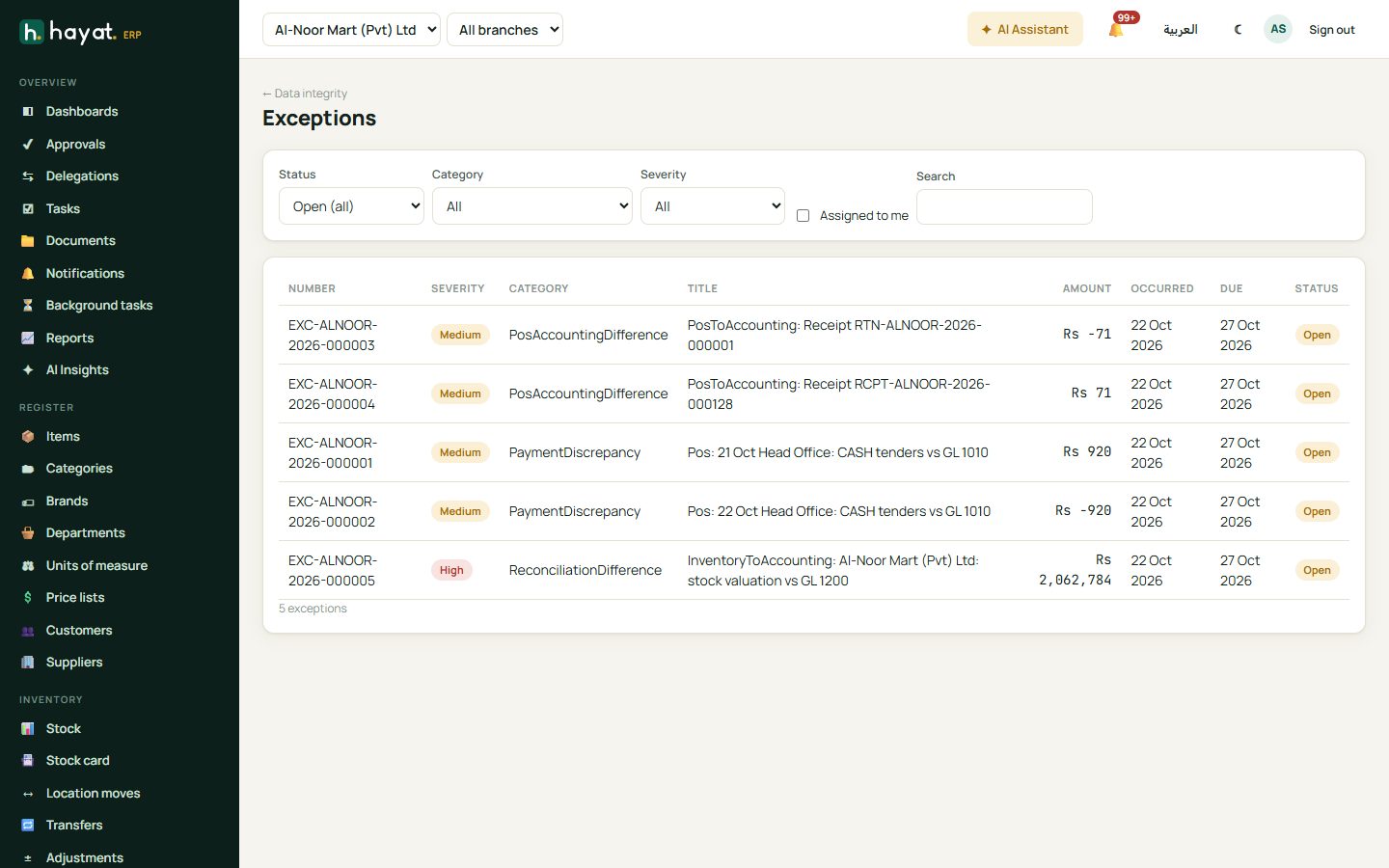
Exceptions lists them with number (EXC-…), severity (Low, Medium, High, Critical), category, title, amount, when it occurred, the due date (red when overdue) and status. Filter by Status (Open (all) by default), Category, Severity, Assigned to me and Search.
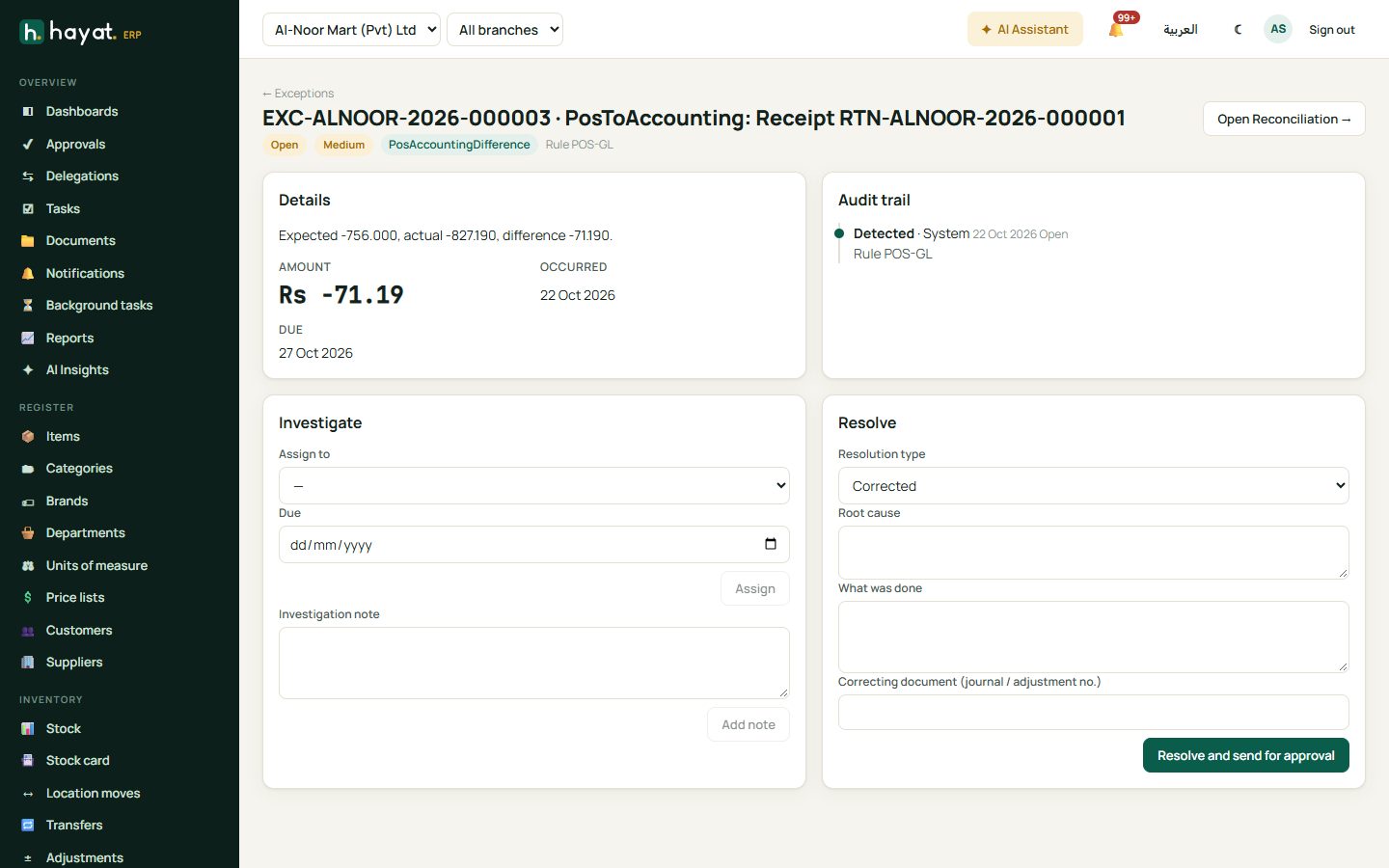
- Open the exception. Details explains what was found and the amount; the header shows the rule. Open … → goes to the receipt, journal, bill or item behind it.
- Investigate: Assign to a person with a Due date (they are notified), or just write an Investigation note and Add note — the first note moves it to Investigating and assigns it to you. The Assign to list shows the active users who can work exceptions in that branch.
- Fix the cause in the source document if needed — a correcting journal, an adjustment, a corrected bill.
- Resolve: choose the Resolution type — Corrected, Explained, WrittenOff, FalsePositive, Disciplinary or ProcessChange — and fill Root cause, What was done and the Correcting document (journal / adjustment no.).
- Resolve and send for approval.
Resolve and approve
A resolution goes through the Reconciliation exception resolution approval workflow (by default, anyone with Approve exception resolutions):
- while it waits the exception is PendingApproval;
- approved, it is Closed — or Dismissed when the type was FalsePositive;
- rejected, it goes back to Investigating with the approver's reason;
- if no approval rule applies, it closes at once.
Re-open (with a reason) brings a closed or dismissed exception back to Investigating. Every step — detected, assigned, notes, resolved, submitted, approved, rejected, re-opened — is written to the Audit trail with the user and time.
Workflow
Where the money goes
Data integrity only reads the books: running a reconciliation, scanning, resolving or approving an exception never posts anything. Corrections are made with ordinary documents — a journal, a stock adjustment, a corrected bill — which post as usual, and their number is written on the exception. See How every module reaches the accounts.