
Shipping: merchant API, webhooks, COD payouts and proof of delivery
shipping.hayaterp.com/shipping/merchant-api ↗For courier companies on Hayat — give merchants an API key to book and track parcels from their own website, push status changes to their webhook, pay many merchants' COD in one batch, and keep a photo and signature as proof of delivery.
These are additions to the Shipping workspace for courier companies. Merchants (your account customers) can book parcels from their own website, app or Hayat itself, get every status change pushed to them, and receive their COD in payout batches with an advice. Riders keep a photo and the receiver's signature with each delivery, and the consignment note carries a QR of the tracking page.
The screens are in Shipping: Merchant API & webhooks and COD payout batches, and on shipping.hayaterp.com in the same menu.
Who does what
| Permission | Typical person | Can do |
|---|---|---|
| Shipping settings, ports, riders, tariffs and shipping reports (shipping.manage) | Shipping admin, IT | Make and revoke API keys; set up, test and retry merchant webhooks. |
| Shipping invoices, receipts, carrier bills, COD remittance and merchant billing (shipping.accounts) | Shipping accounts | Post COD payout batches and send payout advice. |
| Rider: own runsheet, delivery status, COD collected (shipping.delivery) | Rider | Take the delivery photo and signature in Hayat Shipping. |
| See jobs, parcels, voyages and the shipping dashboard (shipping.view) | Counter, operations | See the proof of delivery of a delivered parcel. |
API keys
Shipping → Merchant API & webhooks → + API key.
- Choose the Merchant — a shipping customer with a courier account — and a Name (Website).
- Tick the Scopes —
parcels.write(book, cancel),parcels.read(list, track, quote),cod.read(COD statement),webhooks.manage(set its own webhook). All four are ticked for a new key. - Optional: Expires on.
- Create key. The New key (
hsm_…) is shown once — Copy it and give it to the merchant safely. Hayat keeps only a fingerprint and the hint (hsm_…1a2b).
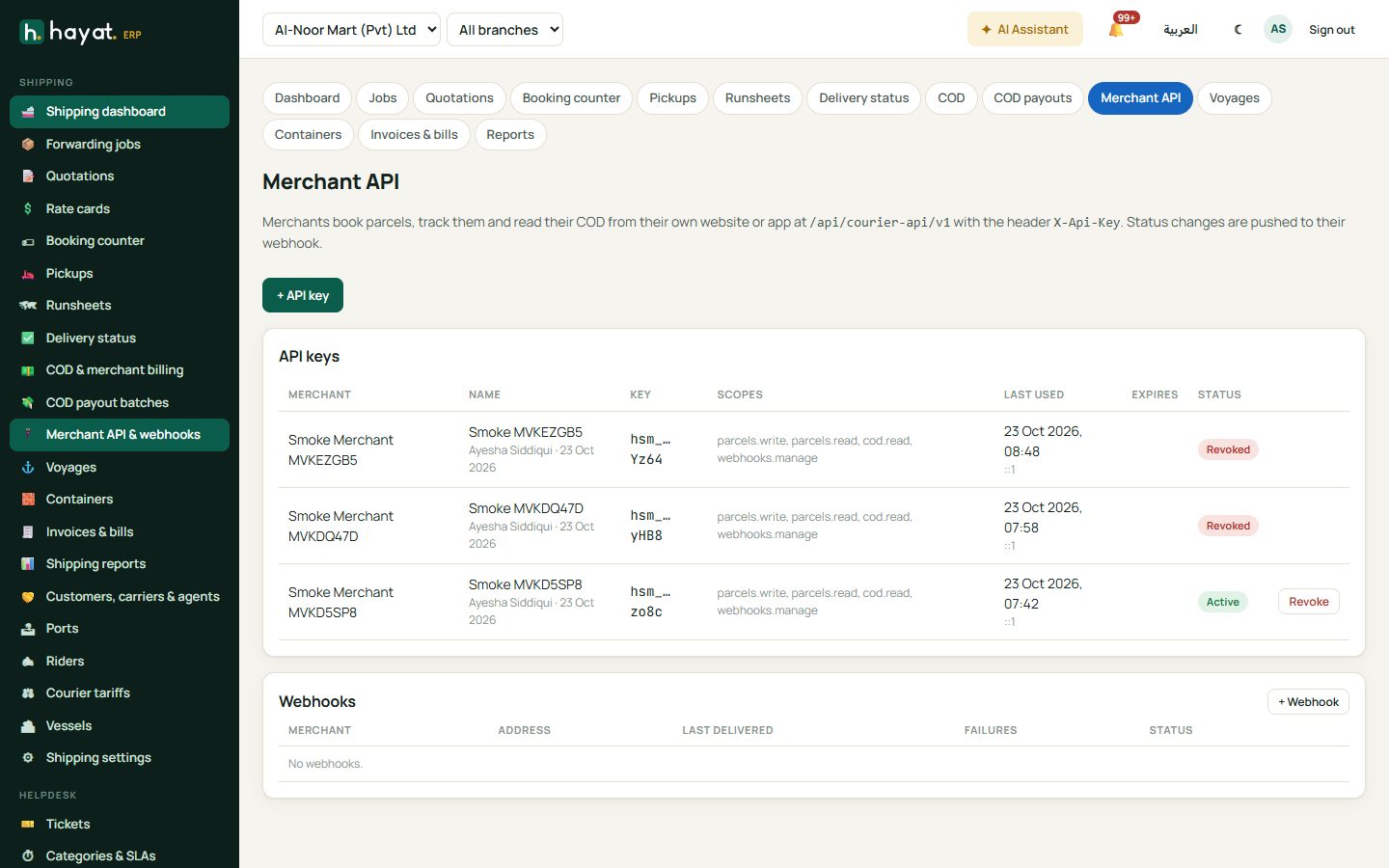
The list shows each key's merchant, hint, scopes, when and from where it was last used, its expiry and status. Revoke stops a key at once. The merchant app Hayat Shipping has Merchant API keys in its menu too (all scopes, no expiry).
The merchant API
Base address: https://<your server>/api/courier-api/v1 (for Hayat's own server, https://api.hayaterp.com/api/courier-api/v1). Every call sends the header X-Api-Key: hsm_…. A key sees only its own merchant's parcels.
| Call | Scope | What it does |
|---|---|---|
GET /me |
– | The merchant and the key's scopes. |
GET /cities |
– | Destination cities. |
POST /quote |
parcels.read | The charges for a parcel: freight, COD fee, total. |
POST /parcels |
parcels.write | Book a parcel. |
GET /parcels?from=&to=&status=&open=&page= |
parcels.read | The merchant's parcels, paged. |
GET /parcels/{code} |
parcels.read | One parcel, by tracking code, CN number or the merchant's own reference. |
GET /parcels/{code}/track |
parcels.read | Status and every tracking event. |
POST /parcels/{code}/cancel |
parcels.write | Cancel while it is Booked and not invoiced. |
GET /cod?from=&to= |
cod.read | COD waiting, collected and paid out (up to one year). |
GET / PUT / DELETE /webhook |
webhooks.manage | The merchant's own webhook address. |
Answers: 401 for a missing, wrong, revoked or expired key; 403 when the key lacks the scope or Shipping is switched off for your business.
Book a parcel
Booking follows the counter's rules: the merchant needs a courier account; at most 500 kg and 100 pieces; pickup from today up to 14 days ahead. The charges come from the merchant's own tariff, else the standard one, and are billed to the merchant's account. One pickup request is made per merchant and day, and your staff are notified.
```http POST /api/courier-api/v1/parcels X-Api-Key: hsm_… Content-Type: application/json
{ "reference": "ORD-10452", "service": "Overnight", "originCity": "Karachi", "receiverName": "Sana Iqbal", "receiverPhone": "03001234567", "receiverAddress": "House 12, Street 4, Gulberg III", "destinationCity": "Lahore", "contents": "Clothes", "pieces": 1, "weightKg": 0.8, "declaredValue": 4500, "codAmount": 4500, "remarks": "Call before delivery", "pickupDate": "2026-10-24" } ```
The answer gives the CN number, the 12-digit tracking code, the charges and two links — the shared consignment note (with the tracking QR) and the public tracking page:
json
{
  "duplicate": false,
  "number": "SCN-…",
  "trackingCode": "…",
  "reference": "ORD-10452",
  "status": "Booked",
  "statusText": "Booked",
  "freight": 250,
  "codFee": 45,
  "charges": 295,
  "codAmount": 4500,
  "labelUrl": "https://my.hayaterp.com/d/…",
  "trackingUrl": "https://shipping.hayaterp.com/track/…",
  "pickup": { "number": "SPU-…", "date": "2026-10-24", "timeWindow": null }
}
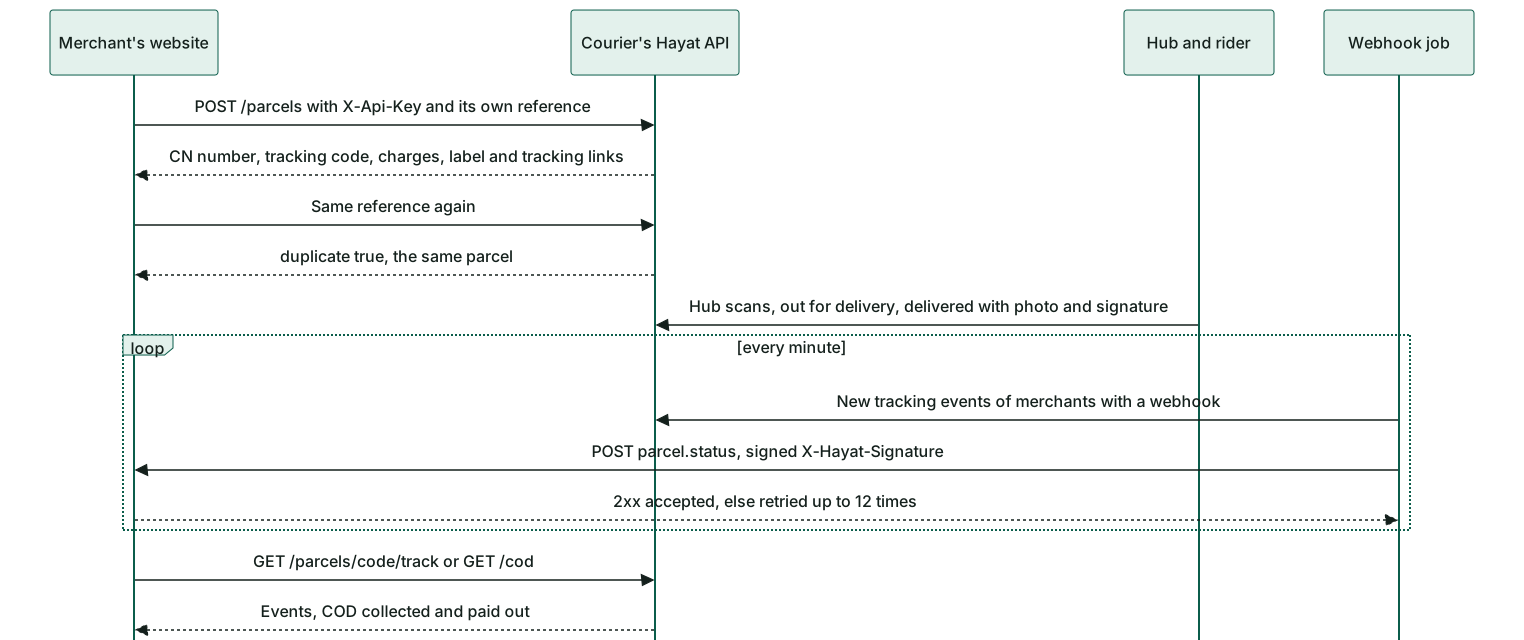
service is Overnight, SameDay or Economy. Send the merchant's own reference every time: booking the same reference again does not make a second parcel — it answers "duplicate": true with the earlier parcel.
Track a parcel
http
GET /api/courier-api/v1/parcels/ORD-10452/track
X-Api-Key: hsm_…
json
{
  "number": "SCN-…",
  "trackingCode": "…",
  "status": "Delivered",
  "statusText": "Delivered",
  "deliveredAt": "2026-10-25T14:32:00+05:00",
  "receivedBy": "Sana",
  "failReason": null,
  "events": [
    { "at": "2026-10-24T11:05:00+05:00", "status": "PickedUp", "label": "Picked up", "city": "Karachi", "note": null },
    { "at": "2026-10-25T14:32:00+05:00", "status": "Delivered", "label": "Delivered", "city": "Lahore", "note": null }
  ]
}
GET /cod answers waiting (COD still with riders), collected (collected, not paid out), payouts (paid out), their totals and the charges deducted.
Webhooks to merchants
A merchant with a webhook gets a push for every new tracking event of its parcels, within about a minute.
- Webhooks → + Webhook (or the merchant calls
PUT /webhook). Choose the Merchant, the Address (https) and tick On. Save. - The Webhook secret is shown once, with the signature rule — Copy it for the merchant. Issue a new signing secret on an existing webhook replaces it.
- Test sends a
pingat once and shows the merchant server's answer.
Each push is a POST of JSON:
```http POST https://merchant.example/hooks/hayat Content-Type: application/json X-Hayat-Event: parcel.status X-Hayat-Delivery: 6f1c… X-Hayat-Timestamp: 1761384720 X-Hayat-Signature: sha256=9b2e…
{ "event": "parcel.status", "at": "2026-10-25T14:32:00+05:00", "trackingCode": "…", "number": "SCN-…", "reference": "ORD-10452", "status": "Delivered", "statusText": "Delivered", "city": "Lahore", "note": null, "codAmount": 4500, "codCollected": 4500, "deliveredAt": "2026-10-25T14:32:00+05:00", "receivedBy": "Sana", "failReason": null, "attempts": 1 } ```
The merchant checks X-Hayat-Signature = "sha256=" + hex(HMAC_SHA256(secret, X-Hayat-Timestamp + "." + raw body)) and rejects pushes older than 5 minutes. Any 2xx answer counts as accepted. Otherwise the push is tried again after 2, 4, 8… minutes (at most 12 hours apart), up to 12 times; a webhook that fails 50 times in a row is Switched off.
Log shows every delivery — event, status, tries, the next try and the answer — with Retry.
COD payout batches
When a rider collects COD, that money is owed to the merchant. Shipping → COD payout batches pays many merchants at once.
- Owed to merchants lists each merchant with collected COD not paid out: pay-to details, parcels, COD, Charges to deduct, Net and the oldest parcel.
- Tick merchants (each may get its own reference), or tick none to pay everyone owed.
- Choose the Date, Method (Bank, Raast, JazzCash), Reference and Notes, then Pay n merchant(s) or Pay everyone owed.
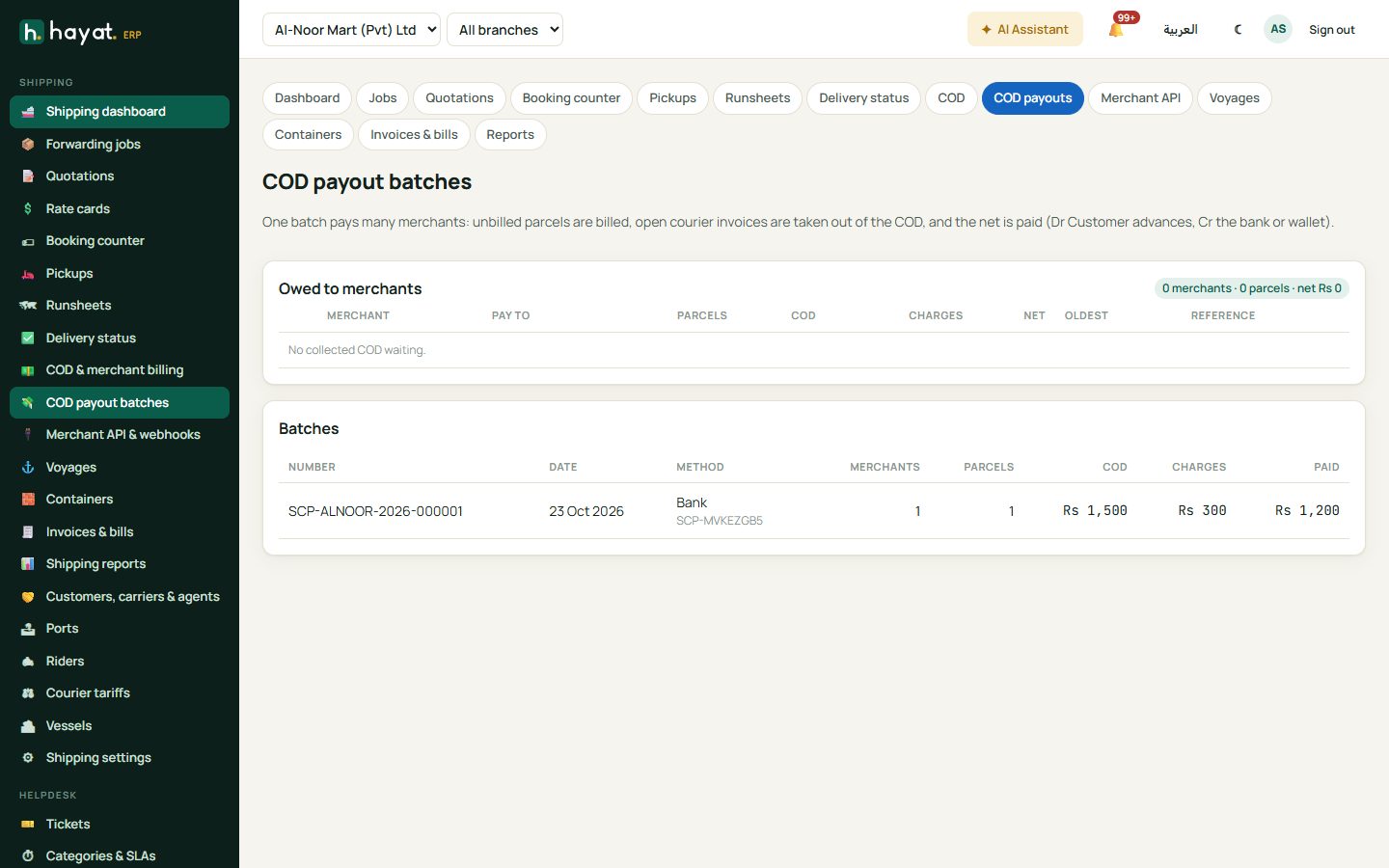
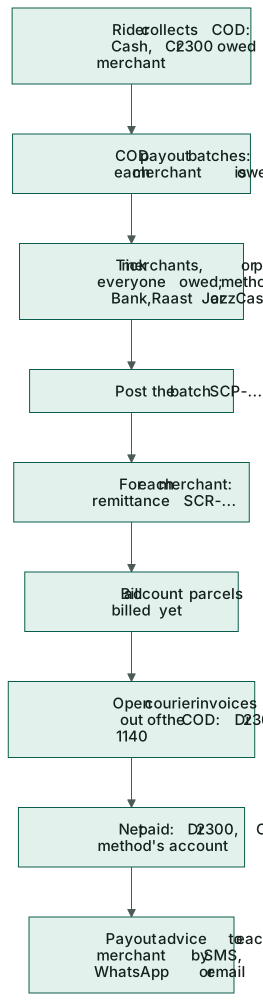
For each merchant the batch (SCP-…) makes an ordinary COD remittance (SCR-…), all in one step: account parcels not billed yet are billed, open courier invoices are taken out of the COD, and the net is paid. Open a batch to Send payout advice to all — by each merchant's usual channel, SMS, WhatsApp or email — or send and copy one merchant's advice. The advice lists each parcel (CN, tracking, receiver, city, delivered date, COD), the COD collected, the charges deducted, the net paid, the method and the reference. The Hayat Shipping app shows COD payouts (To pay and Batches) and sends the advice, but the batch itself is paid from the web.
Proof of delivery
In Hayat Shipping, when the rider records Delivered, the delivery sheet has Take photo and Signature (the receiver signs in the white box, then Use this signature). Both are optional and are sent with the delivery; the photo is checked before anything is posted.
- On the web, a delivered parcel in Delivery status shows Proof of delivery: received by, the time, the rider, who recorded it, the photo and the signature. The app shows the same card on the parcel.
- The public tracking page shows Delivered to the receiver's first name and the time, and the signature. The photo is never public, and the proof opens only by the 12-digit tracking code (not by the CN number, which runs in order).
QR on the consignment note
The printed or shared consignment note now ends with a QR of the public tracking link and the tracking code, so the receiver can scan it to follow the parcel.
Workflow
Where the money goes
| Event | Debit | Credit |
|---|---|---|
| Parcel booked through the API | — (charges billed to the merchant's account later) | |
| COD collected by the rider | 1010 Cash | 2300 Customer advances (owed to the merchant) |
| Batch: unbilled parcels billed | 1140 Client receivables | 4520 Courier & delivery revenue |
| Batch: open courier invoices taken out of the COD | 2300 Customer advances | 1140 Client receivables |
| Batch: net COD paid | 2300 Customer advances | the method's account (1020 Bank, Raast or JazzCash) |
See the Shipping workspace for the rest.