
Hotel online: booking website, channel manager and self check-in
hotel.hayaterp.com/hotel/website ↗Your own booking website with prepayment and cancellation rules, room restrictions, a channel manager that sends availability and rates to the OTAs and brings their bookings in, OTA commission, and online or kiosk check-in with private ID photos.
These screens add to the Hotel workspace. They are in the Hotel menu (and on hotel.hayaterp.com): Online check-ins, Refunds to make, Booking website, Room restrictions, Channel manager and OTA commission. The links at the top of each one move between them.
Who does what
| Permission | Typical person | Can do |
|---|---|---|
| See rooms, bookings, guests and the room rack (hotel.view) | All hotel staff | See the website settings, restrictions, connections and the online check-in queue. |
| Room types, rooms, rates, taxes, services; void charges (hotel.manage) | Hotel manager | Save the website, room types online, restrictions and channel connections. |
| Make, change and cancel bookings; guest profiles (hotel.reservations) | Reservations | Pull OTA bookings now; send a guest the booking or check-in link. |
| Check in, room move, extend stay, check out, blacklist (hotel.frontdesk) | Front desk | Review online check-ins, see the ID photos, complete or return them. |
| Folio charges, payments, advances, refunds and company accounts (hotel.folio) | Front desk, accounts | Close refund tasks, pay OTA commission, make a pay link for a booking. |
| Occupancy, ADR, RevPAR, revenue and ledger reports (hotel.reports) | Accounts | See OTA commission. |
The booking website
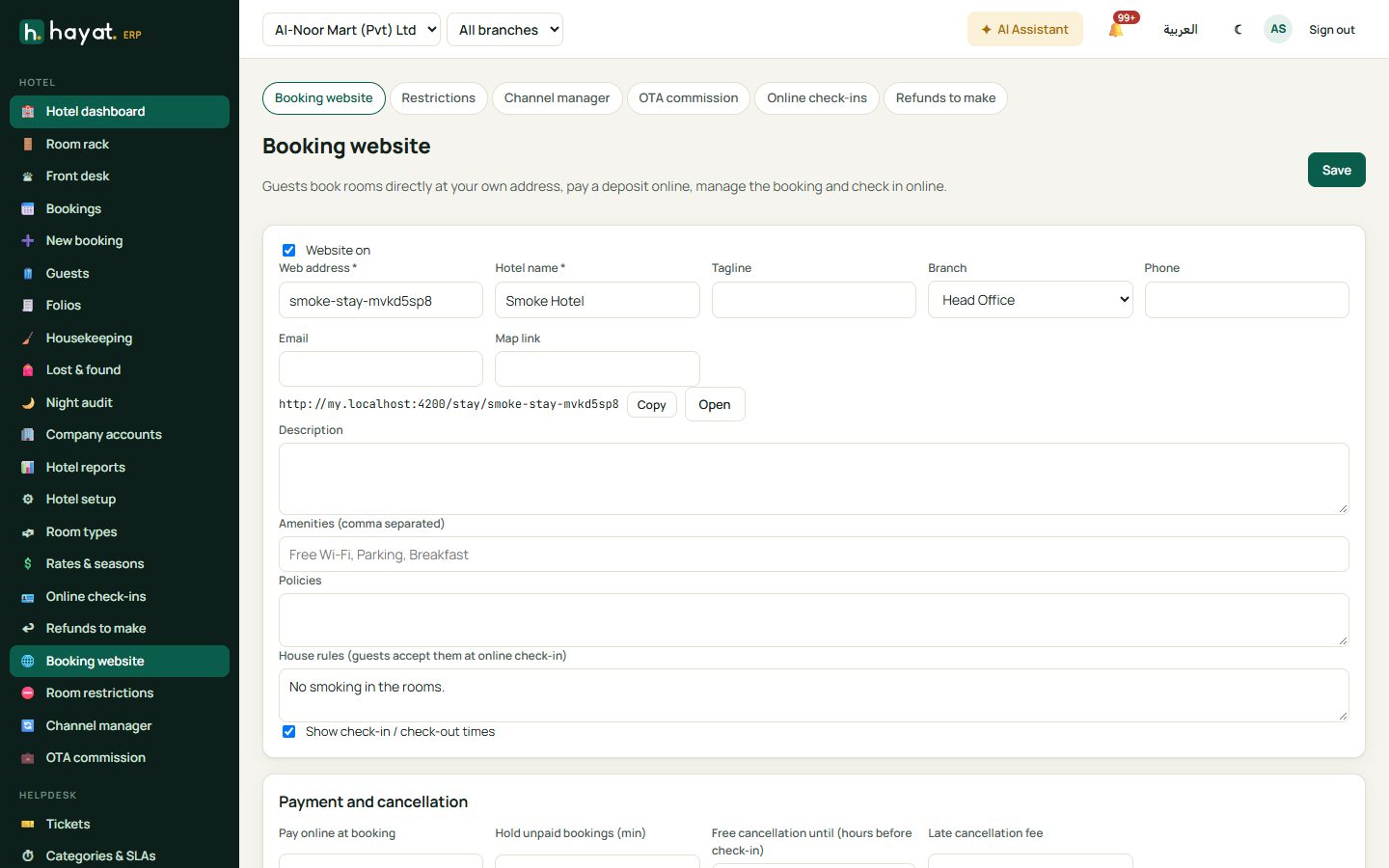
Hotel → Booking website (saving needs hotel.manage).
- Tick Website on. Type the Web address (3 to 60 lower-case letters, digits or dashes, unused by any other business), the Hotel name, Tagline, Branch, Phone, Email and Map link. Once saved, the address my.hayaterp.com/stay/your-hotel shows with Copy and Open, and the Kiosk address below it.
- Description, Amenities (Free Wi-Fi, Parking, Breakfast), Policies and House rules (guests accept them at online check-in). Tick Show check-in / check-out times.
- Payment and cancellation: Pay online at booking — Nothing (pay at the hotel), First night, A percentage (Deposit %) or Everything — and Hold unpaid bookings (min). Free cancellation until (hours before check-in), the Late cancellation fee (None, First night, A percentage, Everything), the Cancellation policy (text) and Show prices with tax.
- Limits: Rooms per booking, Nights per booking, Book up to (days ahead) and Children up to age (older children count as adults).
- Online check-in: Guests can check in online, Opens (days before arrival), A photo of the ID is required, ID of every adult (else the main guest only) and Lobby kiosk.
- Photos with captions (+ Photo, ‹ to move, ✕ to remove). Save.
- Room types on the website: Edit each type — Bookable online, Bed (1 king bed), Size (m²), Order, Description on the website and its own photos.
What the guest sees
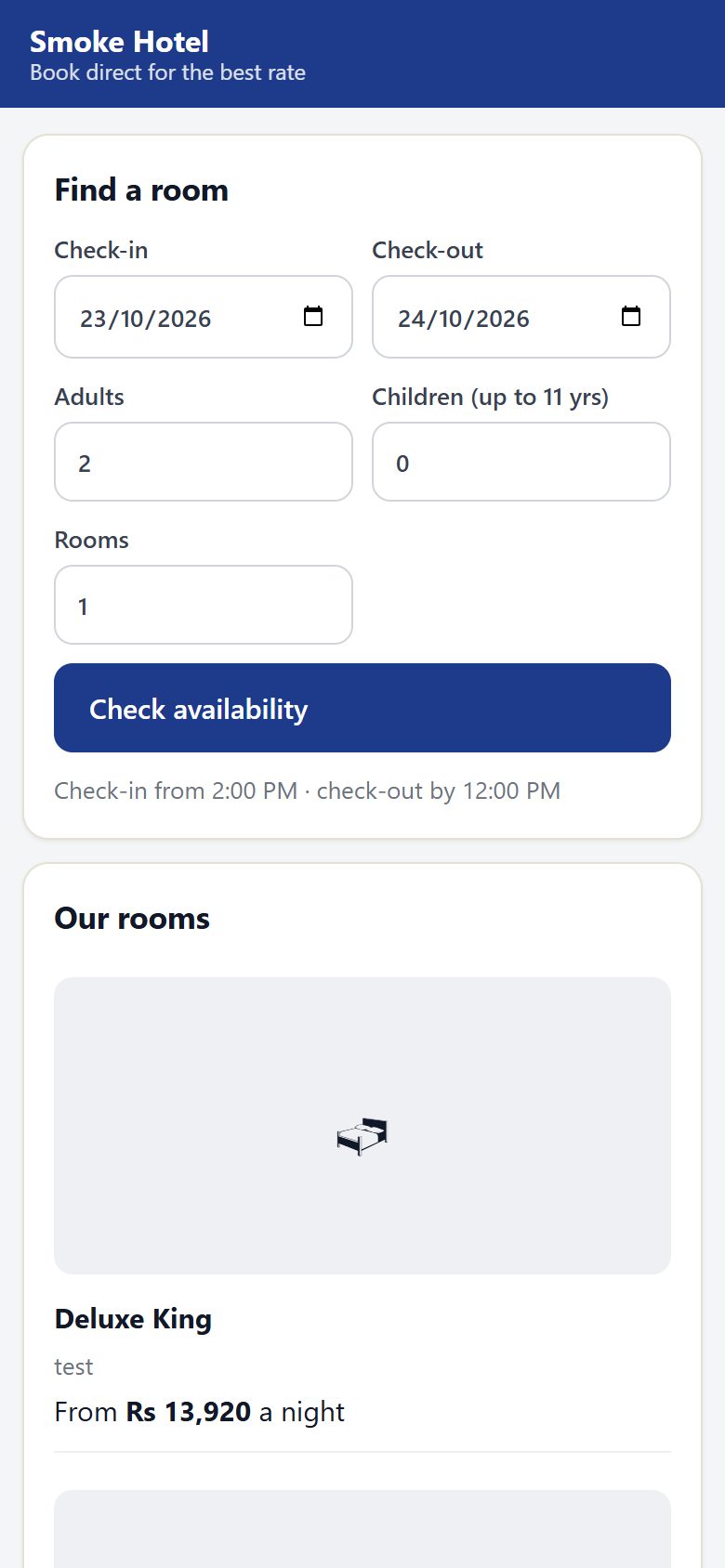
On my.hayaterp.com/stay/your-hotel the guest reads about the hotel and Our rooms (each with its lowest nightly price in the next 60 days), then:
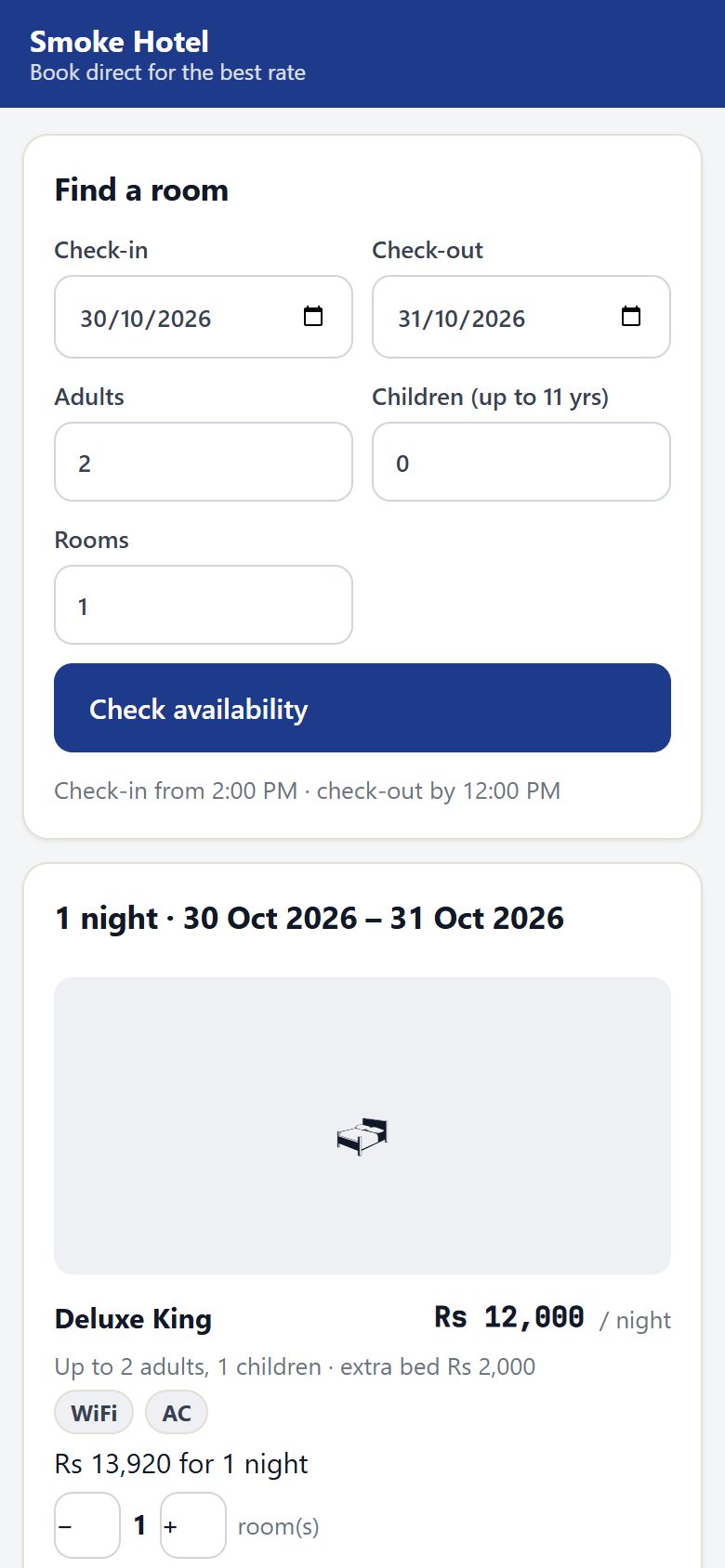
- Find a room: Check-in, Check-out, Adults, Children, Rooms and Check availability.
- Each free room type shows its average price a night, the total with tax, who it fits and why it cannot be booked (no rooms left, minimum stay…). + adds rooms.
- Guests per room, the Meals plan and a Promo code, then See the price: rooms, promo, service charge, tax, Total, Pay now and Pay at the hotel, and the cancellation terms with the free-cancellation time.
- Your details: Full name, Mobile, Email, Nationality, Arriving around, Special requests; tick I accept the booking and cancellation policy and Book and pay (amount) (or Confirm booking when nothing is due now).
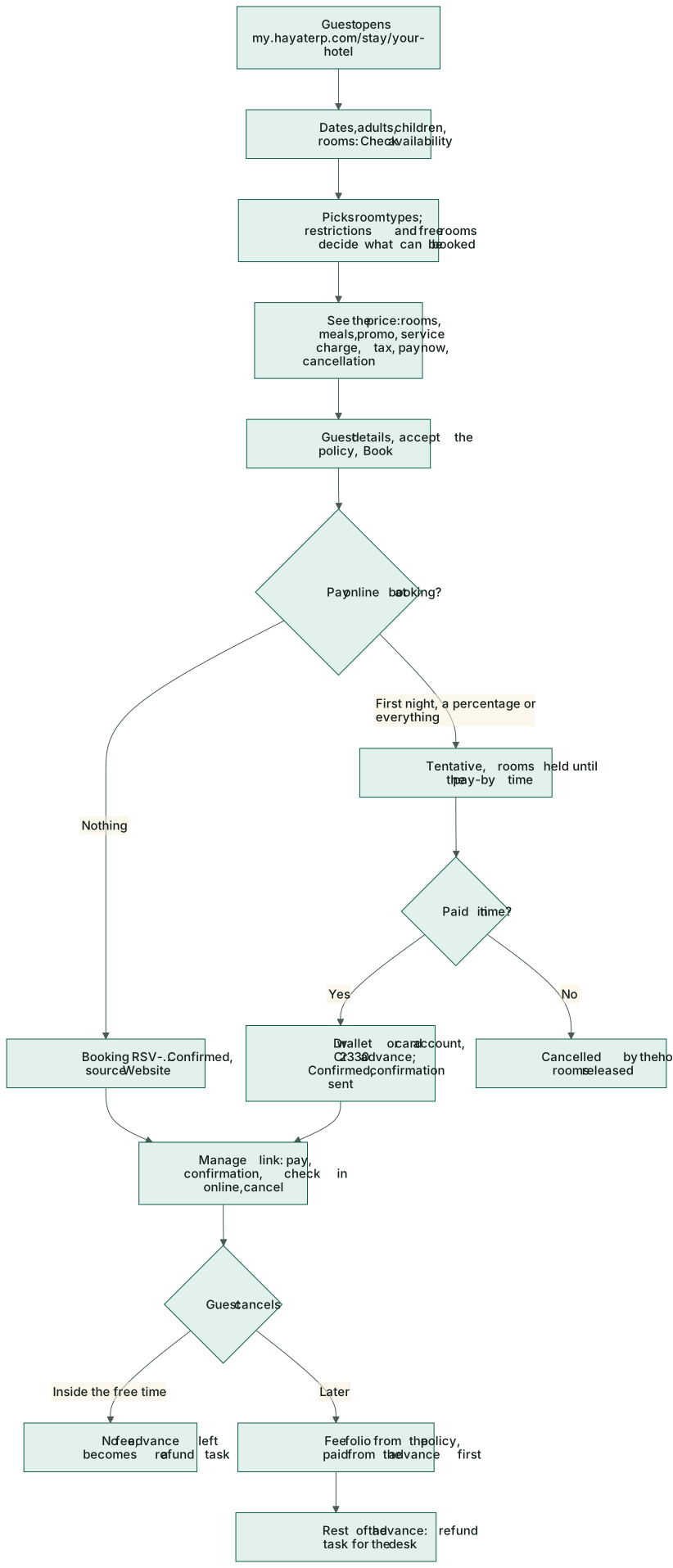
The booking is a normal RSV-… booking with source Website, priced exactly like the desk (seasons, weekends, meal plans, extra beds). The guest is matched by phone or added; a blacklisted guest is refused politely. Staff with bookings permission are notified.
- Nothing to pay now → Confirmed, and the confirmation is sent (when auto-send is on for hotel bookings).
- Prepayment → Tentative; the rooms are held until the pay-by time (Hold unpaid bookings). Paid in time, it becomes Confirmed and the confirmation goes out. Not paid, it is cancelled by itself and the rooms are released.
- A promo code takes only the code's own discount off the room nights now; your automatic promotions still apply at check-out as for any booking.
The confirmation has the booking, rooms, meals, taxes, what was paid and what is still due, the free-cancellation time, the manage link and a QR and link for online check-in.
The guest's booking page
The manage link opens Your booking: status, dates, rooms, totals, paid and due. Pay online, 📄 Confirmation, 🪪 Check in online, and Cancel the booking with what cancelling costs now. Bookings made through an OTA cannot be cancelled here.
Cancellations and refund tasks
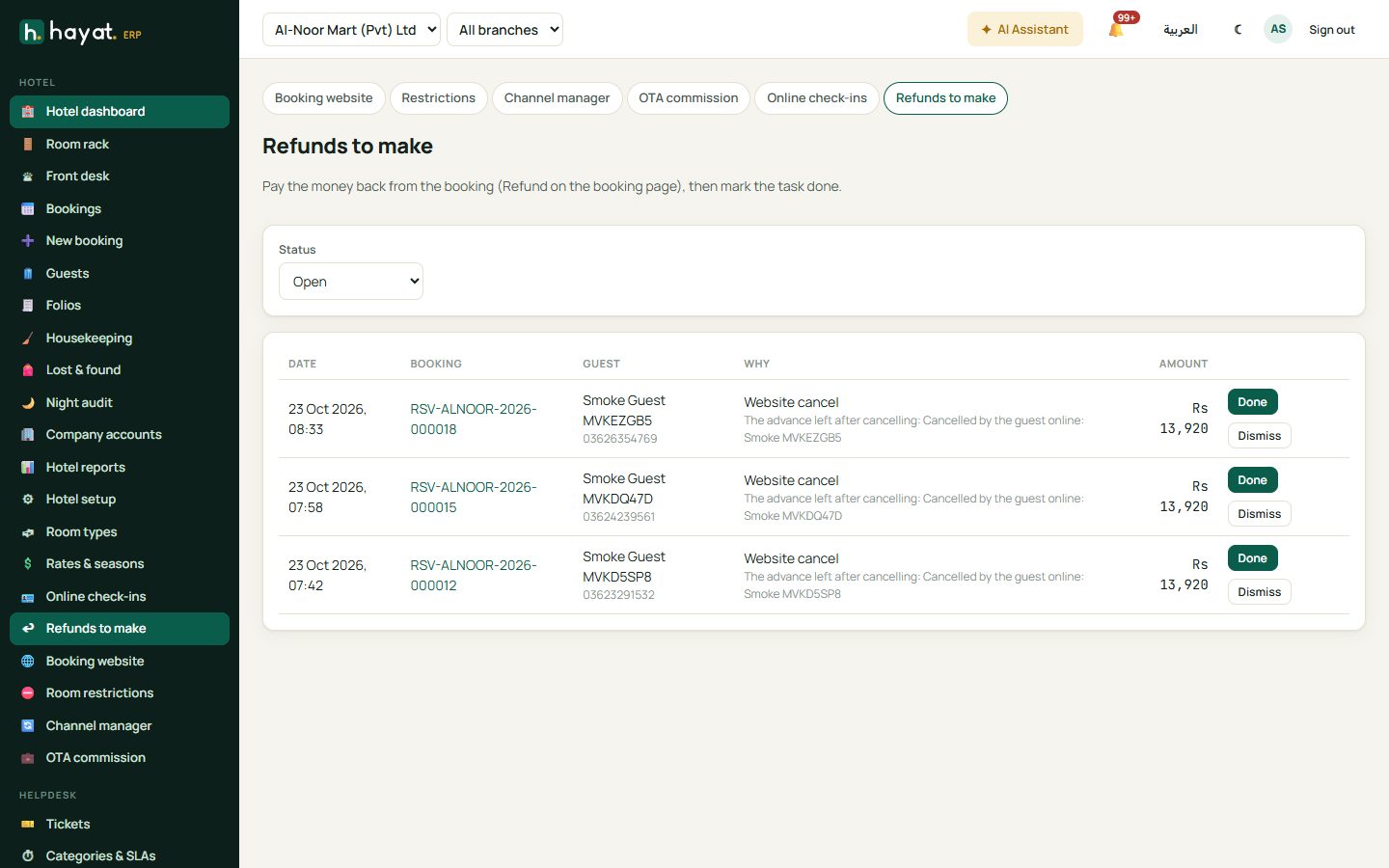
Inside the free-cancellation time there is no fee. Later, the policy's fee goes on a fee folio and is paid from the advance first. What is left of the advance is never paid back by itself: it becomes a task in Hotel → Refunds to make (also for OTA cancellations, holds that expired after a part payment, and money paid after a booking was closed). Pay it with Refund advance on the booking, then click Done (or Dismiss) on the task.
Room restrictions
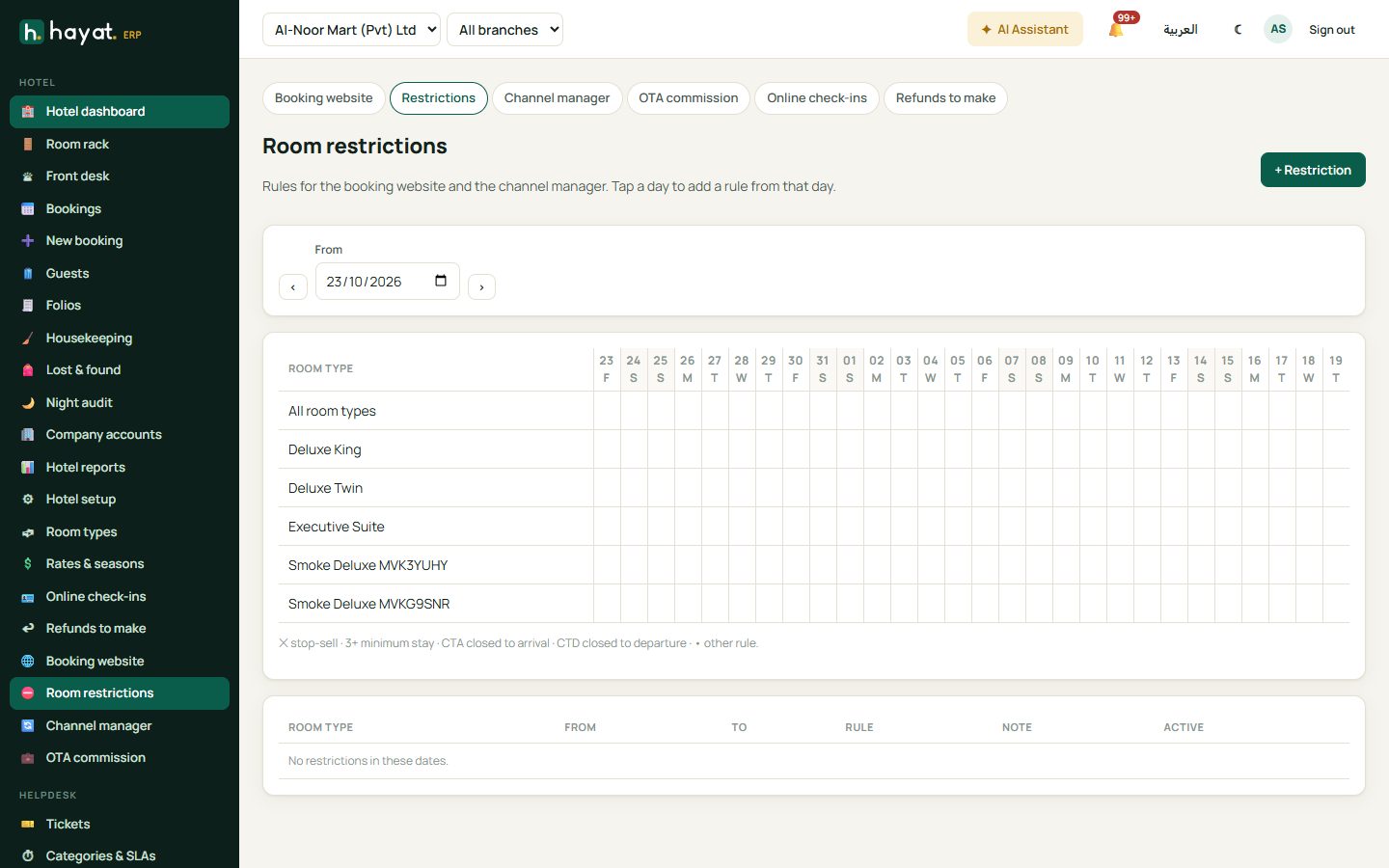
Hotel → Room restrictions is a 28-day calendar with a row for All room types and one per type: ✕ stop-sell, 3+ minimum stay, CTA closed to arrival, CTD closed to departure. Tap a day or + Restriction to add a rule from that day: Room type, From, To (inclusive), Minimum stay, Maximum stay, Stop selling, Closed to arrival, Closed to departure, Active and a Note. The rules apply to the booking website and the channel manager.
Channel manager
Hotel → Channel manager connects Hayat to a channel manager that sells your rooms on Booking.com, Expedia, Agoda and other OTAs.
- + Connection: Name, Provider, API address, Hotel code at the channel, Default commission % and Days ahead (365). Tick Active and Pull bookings every 15 minutes if the channel does not call a webhook.
- Endpoints (blank = default) and Credentials (names such as bearer, apiKey, username, password; a blank value keeps the saved one).
- Room mapping: the Channel room code of each room type.
- Rate plans: code (BAR), name, meal plan code and Markup %.
- OTAs and commission: code, name (Booking.com), commission % and the Expense account to post it to.
- Save. The Webhook secret is shown once — give it and the webhook address to the channel manager.
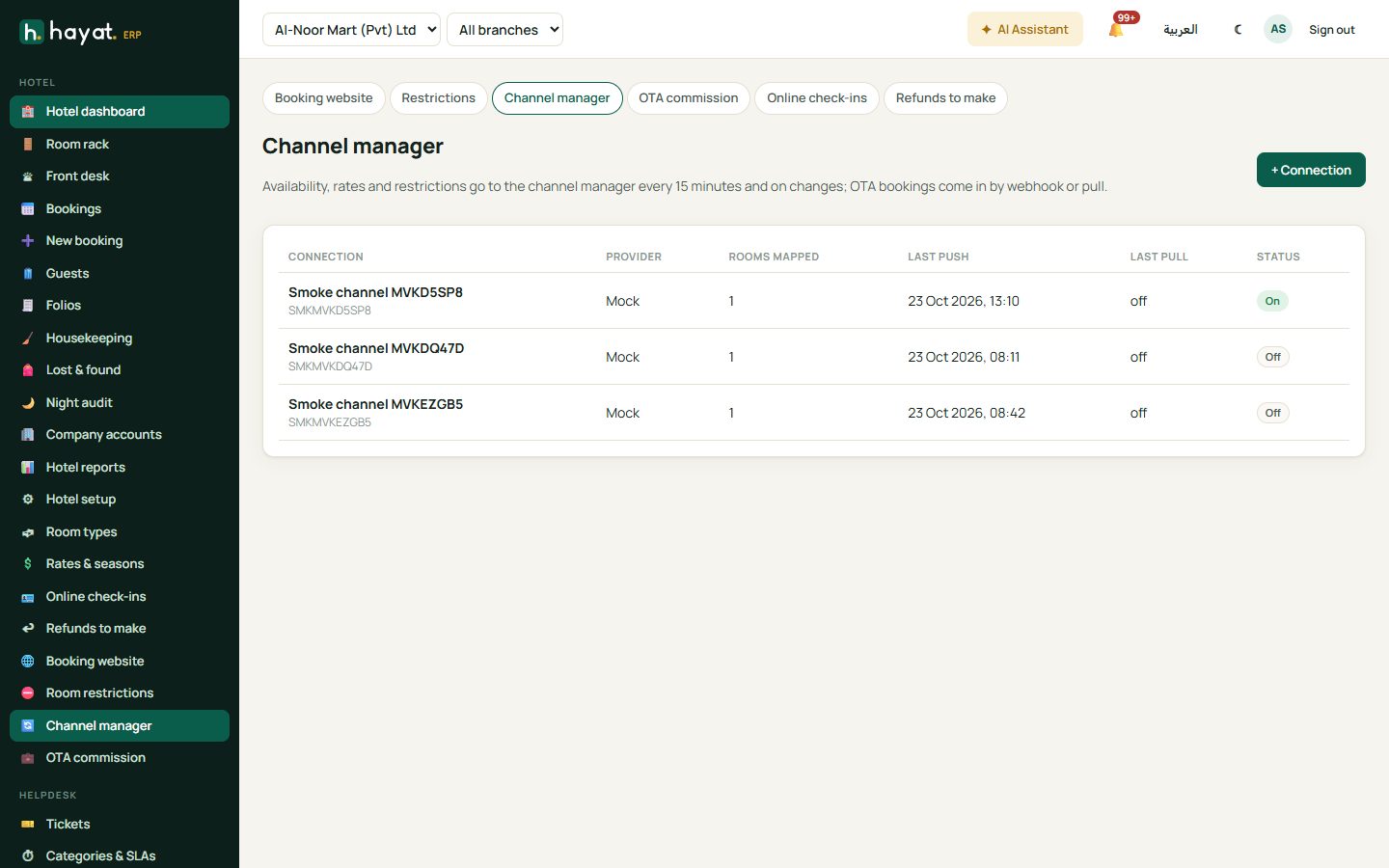
Open a connection for Copy webhook, Edit, Test, Push changes, Push everything, New webhook secret and Pull bookings. Last sent shows the availability and rate of the next 60 room-nights as sent, Log the pushes, pulls and webhooks (with Failures only), and OTA bookings the bookings received with their commission.
What is sent
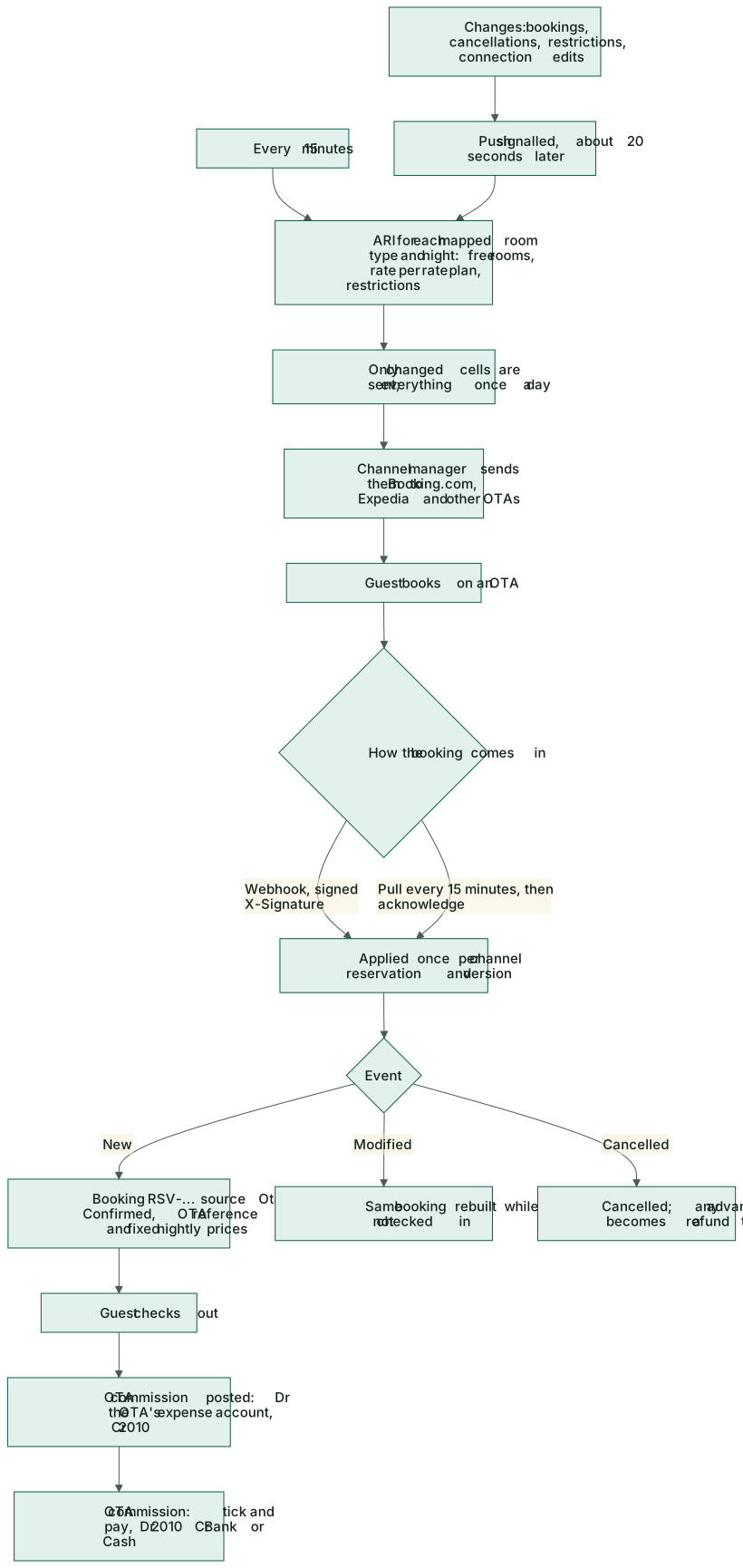
For each mapped room type and night: the rooms free to sell (rooms not out of order or blocked, less bookings and in-house stays), the rate of each rate plan (season or weekend rate plus the markup, plus the meal plan), and the restrictions. Only what changed is sent, every 15 minutes and about 20 seconds after a website booking, cancellation, restriction or connection change; everything once a day. Bookings and room changes made at the desk reach the channels within 15 minutes.
OTA bookings coming in
A new OTA booking becomes an RSV-… booking with source Ota, Confirmed, the OTA's reference and name, and the OTA's nightly prices kept as fixed rates. A booking received twice (same version) is taken only once. A change rebuilds the booking while the guest is not yet in house; a cancellation cancels it (any advance becomes a refund task). If an OTA booking arrives for a room type that is full, it is still taken — the OTA has already confirmed it — and the desk gets a critical alert. OTA guests get the self check-in link too.
OTA commission
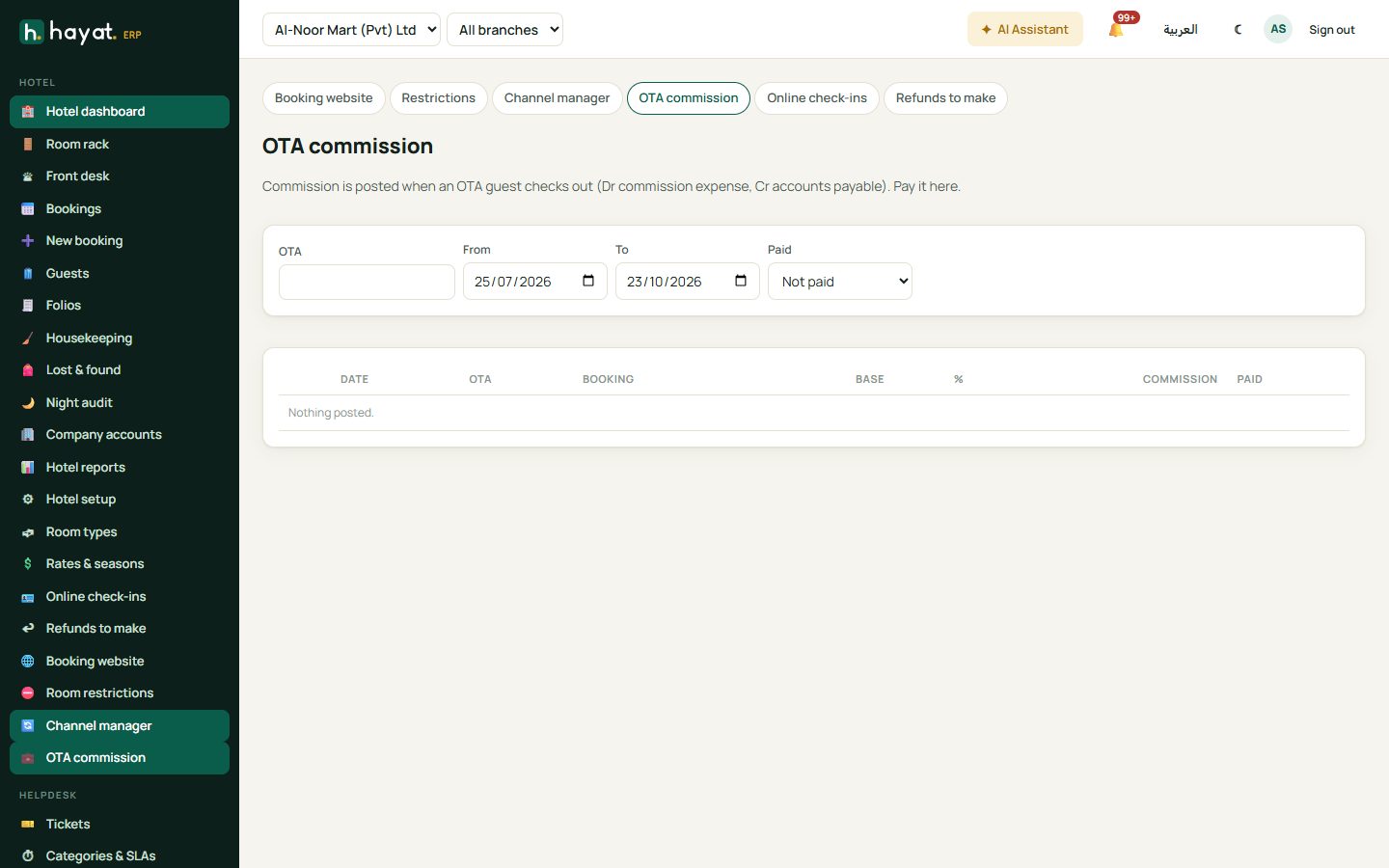
Commission is posted when the OTA guest checks out: the room revenue of the stay (before tax) × the OTA's %, or the amount the channel sent. Cancelled and no-show bookings carry none.
Hotel → OTA commission shows the total per OTA and every stay (date, OTA and reference, booking, base, %, commission, paid). Filter by OTA, dates and Paid. Tick unpaid stays of one OTA, choose Bank or Cash, a Reference and date, and Pay commission.
Self check-in
Guests check in before they arrive, on their phone or at a lobby kiosk, and the front desk only checks the ID and hands over the key.
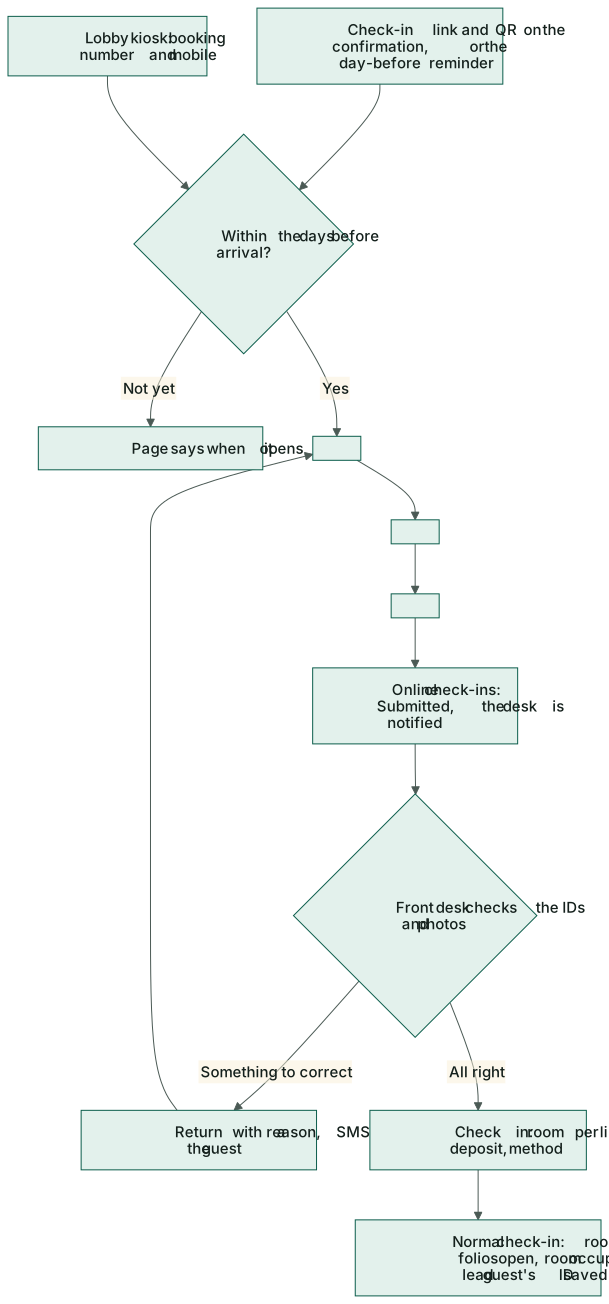
- The check-in link and QR are on the website and OTA confirmations. For a desk booking, Hayat Hotel's booking screen can send it by WhatsApp, SMS or email.
- Switch on Hotel online check-in (day before arrival) in Marketing → Reminders: Dear {name}, your stay at {hotel} starts tomorrow, {date}. Check in online now and skip the queue: {link}.
- The page opens Opens (days before arrival) days ahead, until the arrival day, for Tentative and Confirmed bookings.
The guest's three steps on my.hayaterp.com/stay/your-hotel/checkin/…:
- Guest details: for each guest the Full name (as on the ID), ID type (CNIC, Passport, NICOP, Other), ID number, ID expiry, Nationality, Date of birth and the Main guest; also Arriving around and an email. CNIC numbers are checked and expired IDs refused. Save and continue.
- Photos of the ID: front and back of each ID (the phone's camera opens). Required when A photo of the ID is required is on.
- House rules and signature: tick I have read and accept the house rules, sign with a finger or mouse, and Send to the front desk.
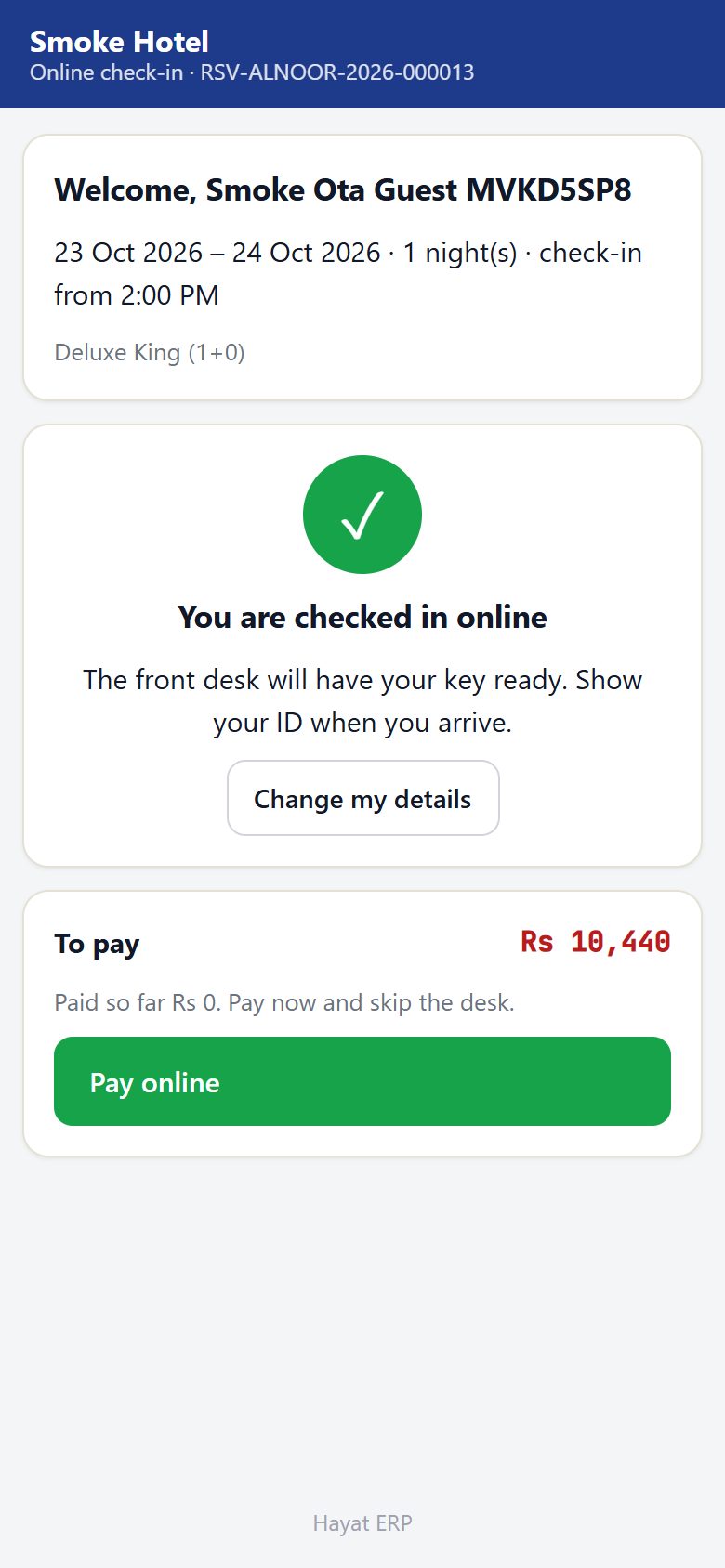
The guest then sees You are checked in online and can still Change my details (which sends it back to draft) or Pay online what is due.
Lobby kiosk. With Lobby kiosk on, a tablet in the lobby opens my.hayaterp.com/stay/your-hotel/kiosk: Check in here asks for the Booking number and the Mobile number on the booking (arrivals today or tomorrow) and opens the same three steps, with Start over and a return to the start after 2 minutes idle.
At the front desk
Hotel → Online check-ins lists check-ins To review (submitted and returned) — filter by Status and Arriving. Open one to see each guest's full ID details, the ID photos and the signature, a warning when the guest is blacklisted or VIP, and the rooms.
- Check the photos against the details.
- Complete the check-in: for each reserved room keep the assigned room, take the First free clean room, or pick one. Optionally a Deposit now with Method and Reference; tick Allow a room not cleaned yet if needed. Check in.
- Something wrong? Send back to the guest: type what to correct, tick SMS the guest and Return.
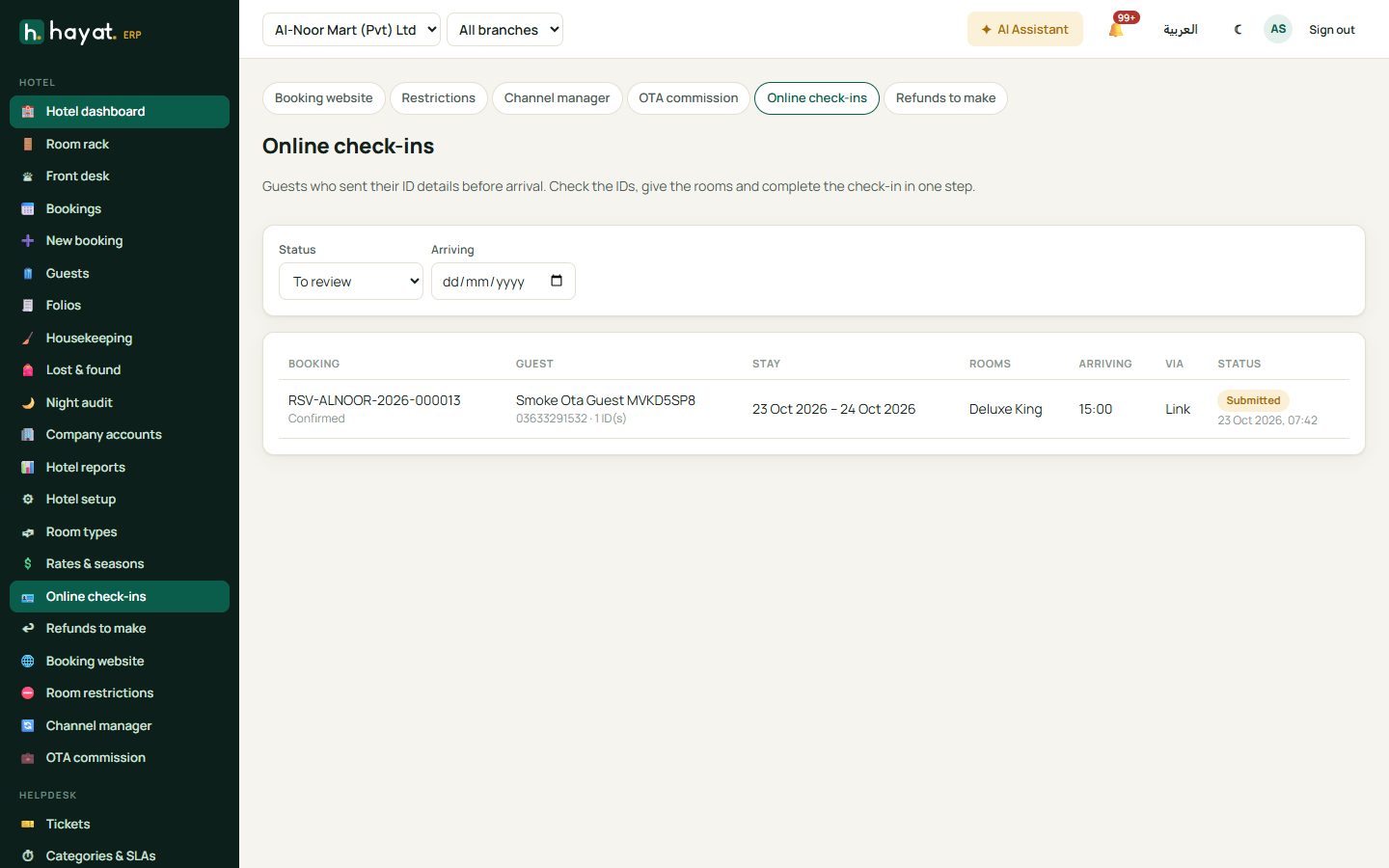
Check in runs the normal check-in — the same checks, room folios, room status and the main guest's ID saved — and marks the online check-in Completed. The other guests' IDs stay on the online check-in as the guest register. The Hayat Hotel app has the same queue (Online check-ins: To review, Arriving today, Done) and a n online check-in(s) to review card on Today.
ID privacy
ID photos and signatures are stored privately. They are never on a public page or link: only staff with Check in, room move, extend stay, check out, blacklist (hotel.frontdesk) can open them, inside the review screen and the app. The guest's own page shows the saved ID number masked (••••1234) — to change the details they type it again.
Workflow
Where the money goes
Website and kiosk payments are recorded exactly like a desk advance on the booking. See also the Hotel workspace.
| Event | Debit | Credit |
|---|---|---|
| Prepayment or balance paid online (website, manage link, check-in page) | 1030 Digital payments / 1040 Card / 1045 BNPL | 2330 Fees & deposits received in advance |
| Advance used at check-out | 2330 | 1130 Guest receivables |
| Late cancellation fee (fee folio, no tax) | 1130 Guest receivables | 4310 Room revenue |
| Fee paid from the advance | 2330 | 1130 Guest receivables |
| Advance refunded by the desk (refund task) | 2330 | 1010 Cash / 1020 Bank |
| OTA commission, at check-out | the OTA's expense account (default 6900 General expense) | 2010 Accounts payable (memo OTA commission) |
| OTA commission paid | 2010 Accounts payable | 1020 Bank / 1010 Cash |