
Running Hayat Food and Hayat Ride
admin.hayaterp.com/go ↗For the Hayat team running Hayat Food and Hayat Ride from admin.hayaterp.com — setup (Go:PlatformTenantId and the other server settings), cities, vehicle types, fare cards, zones and surge, promos, driver verification, the live dashboard and dispatch, SOS handling, customers, wallets and weekly driver payouts, the platform's books and account codes, Food merchant approval, commission and payouts, orders, disputes and refunds, fees and banners, and the privacy and security rules.
Hayat Food (food and groceries) and Hayat Ride (rides and parcels) share one engine, Hayat Go: one customer account per mobile number, one dispatcher, one set of drivers, and the wallets of customers, drivers and merchants. Unlike Hayat Bazaar, Hayat holds the money here: customers pay Hayat, and Hayat pays merchants and drivers, keeping its commission. That money is booked in one Hayat business, the platform tenant.
The panel's menu has two sections:
| Hayat Go (Ride) | Hayat Food |
|---|---|
| Live dashboard, SOS & reports, Drivers, Rides, parcels & jobs, Fares, zones & surge, Wallets, Driver payouts | Food overview, Merchants, Orders & refunds, Disputes, Merchant payouts |
The tab bar on each screen adds Customers, Promos and Books (Hayat Go) and Reviews, Promos and Fees, cuisines & banners (Hayat Food).
Who does what
| Who | Signs in | May |
|---|---|---|
| Platform operator | admin.hayaterp.com (operator account) | Every screen on this page. |
| Staff of the platform tenant with Hayat Food / Hayat Ride operations: drivers, rides, deliveries, wallets (platform business only) (go.view) | the API only | Read the Hayat Go operator data. In the Management, Auditor, Admin and Company Admin roles. |
| … with Approve drivers, fares, zones, promos, payouts and refunds for Hayat Food / Hayat Ride (platform business only) (go.manage) | the API only | Change it, see full CNIC numbers and documents, download payout files. In the Admin and Company Admin roles. |
The two go. permissions work only for users of the platform tenant; in any other business they do nothing. The screens on this page are on admin.hayaterp.com only. The Hayat Food operator screens need the operator sign-in.
Setup
- Choose the platform tenant: a Hayat business with a chart of accounts, working SMS settings and a payment gateway (Online payments → gateway settings, module Online payments on). Set the server setting Go:PlatformTenantId to it (and Go:PlatformCompanyId if it has several companies). Until then the dashboard warns Go:PlatformTenantId is not set: no online top-ups, SMS or books posting until it is.
- Switch on the modules: Hayat Go for the platform tenant (for its staff's go. permissions) and Hayat Food for every restaurant or shop that will sell (both are opt-in).
- Set the server settings below and the account codes in Books and accounts.
- Check the starting cities, vehicle types and fare cards in Fares, zones & surge, and the fees and commission in Fees, cuisines & banners.
- Publish the three apps and point the sites food.hayaterp.com and ride.hayaterp.com at the server (the API must allow both sites and expose the X-Go-Token headers).
- Approve the first drivers and merchants.
Server settings
| Setting | Default | Use |
|---|---|---|
| Go:PlatformTenantId | — (required) | Books, payment gateway, SMS and sign-in codes, operator staff. |
| Go:PlatformCompanyId | the first company | Company of the journals and pay links. |
| Go:PublicBaseUrl:Ride / :Food | https://ride.hayaterp.com / https://food.hayaterp.com | Links in texts: shared trips, parcel tracking, order tracking. |
| Go:Routing:Provider, Url, Key | none | osrm or google (a server-side key) for road distances; otherwise straight line × 1.35 at 22 km/h. |
| Go:CashLimitDefault | 5000 | How much cash a driver may owe. |
| Go:MaxSurge, Go:FareRoundTo | 3, 10 | Highest busy-time multiplier; fares rounded to Rs 10. |
| Go:TopUp:Min / Max | 100 / 50000 | Wallet top-ups (at most 10 an hour per customer). |
| Go:Payout:MinAmount, AutoWeekly, Day | 500, true, Monday | Weekly driver payouts. |
| Go:Accounts:PayoutBank | 1020 | Bank account driver payouts are paid from. |
| Go:Sos:OperatorPhones | — | Control-room phones texted on every SOS. |
| Go:TokenDays | 90 | How long customers and drivers stay signed in. |
| Food:AutoRejectMinutes | 5 | A new order not accepted in time is rejected and refunded. |
| Food:DefaultCommissionPercent | 20 | When neither the merchant nor its kind has a rate. |
| Food:OnlinePayMinutes | 30 | Unpaid online orders are cancelled. |
| Food:MaxDispatchAttempts | 3 | Rider requests before No rider was available (full refund). |
| Food:PostPlatformJournal | true | Food posts its own journals — keep it on. |
Dispatch settings
| Setting | Default | Use |
|---|---|---|
| Go:Dispatch:RingKm | 2, 4, 7 | The search radii, one ring after the other. |
| Go:Dispatch:DriversPerRing | 5 | Drivers offered a job in each ring (nearest first, then rating, then acceptance rate). |
| Go:Dispatch:OfferSeconds / BidSeconds | 15 / 40 | How long an offer, or an offer-your-fare bid, stays open. |
| Go:Dispatch:ReofferAfterSeconds | 60 | When a driver who let an offer expire may get it again (declined drivers never). |
| Go:Dispatch:NoDriverMinutes / DeliveryNoDriverMinutes | 5 / 20 | When a ride / a delivery gives up with No driver. |
| Go:Dispatch:DeliveryLeadMinutes | 8 | A food delivery's search starts this much (plus 10 minutes) before the food is ready. |
| Go:Dispatch:LocationStaleSeconds | 90 | A driver without a newer position gets no offers. Drivers silent for 10 minutes are set offline. |
| Go:Dispatch:MinRating | 0 | Lowest rating offered jobs (after 5 ratings). |
| Go:Dispatch:MaxSpeedKmh | 180 | A faster jump is ignored and flagged as fake GPS. |
A driver gets an offer only when approved, online, free, with the right vehicle type (rides: the booked type; parcels and deliveries: types marked for them) and — for cash jobs — while their wallet is above minus their cash limit.
Cities, vehicle types and fare cards
Fares, zones & surge (Changes apply to new quotes at once. Trips already booked keep their price.) works per City.
Fare cards — one per vehicle type, with a Sample 5 km / 15 min fare: Base fare (Rs), Per km (Rs), Per minute (Rs), Booking fee (Rs), Minimum fare (Rs), Commission % (0–60), Free waiting (min), Waiting per minute (Rs), Cancellation fee (Rs), Fee after (min on the way), Lowest offer (% of fare, 30–100) and Offered in this city. No fare card: this vehicle is not offered in this city. The fixed fare is the larger of the minimum fare and base + km × per km + minutes × per minute, times the surge, rounded to Rs 10, plus the booking fee.
The starting cards (Karachi; base, per km and minimum 5% lower in Lahore and 5% higher in Islamabad / Rawalpindi; every card 3 free waiting minutes, fee after 3 minutes, lowest offer 70%):
| Vehicle | Base | Per km | Per min | Booking | Minimum | Commission | Wait / min | Cancel fee | Does |
|---|---|---|---|---|---|---|---|---|---|
| Bike | 60 | 22 | 2 | 10 | 120 | 15% | 3 | 50 | rides, deliveries |
| Rickshaw | 90 | 35 | 3 | 15 | 180 | 15% | 4 | 80 | rides |
| Car Economy | 150 | 55 | 5 | 20 | 300 | 18% | 6 | 120 | rides |
| Car AC | 220 | 75 | 7 | 25 | 400 | 20% | 8 | 150 | rides |
| Parcel Bike | 100 | 25 | 1 | 10 | 150 | 15% | 3 | 50 | parcels, deliveries |
The Parcel Bike card also prices Hayat Food delivery fees (base + km × per km, at least the minimum, times surge, rounded up to Rs 5).
Cities (+ New city): Code, Name, Urdu name, the Centre picked on the map, Radius, Order, Active. Vehicle types (+ New vehicle type): code, Name, Urdu name, Icon (Material name), Description, Seats and what it Does — Rides, Parcels, Food / grocery deliveries.
Zones and surge
- Zones (+ New zone): Name and Shape — Centre + radius (Radius (km)) or Polygon drawn on the map (Undo corner, Clear). No zones: surge can still apply to the whole city.
- Surge (+ New surge rule): Name (Evening rush), the zone or Whole city, a vehicle type or All, Multiplier (1–10) (capped by Go:MaxSurge), the days, From time (PKT) / To time, Starts on / Ends on, Active. No days ticked = every day. A time window may cross midnight (22:00 → 02:00). A rule in force shows live; customers see Busy ×n.
Promos
Promos (Hayat Go) — Codes customers type when they book a ride or parcel. Hayat Food has its own offers (Hayat Food → Promos). + New promo: Code (EID25), Kind (Percent off / Flat Rs off), the value, Max discount (Rs, 0 = none), the minimum fare, the services (none ticked = all), a city or All cities, Starts / Ends, Total uses (0 = unlimited), Uses per customer, First ride only, Description (customers see it). Ride promos apply to fixed fares only and are paid by Hayat.
Hayat Food offers are under Hayat Food → Promos.
Driver verification
Drivers — Hayat Captain sign-ups waiting for review are listed first. Tabs by status (Under Review first, Applied, Approved, Suspended, Rejected, all), Search by name, phone or full CNIC, and City. Open a driver:
- Documents: open each (View, Open PDF) — CNIC front and back, licence, vehicle registration, selfie, vehicle photo — and Accept it, or reject it with a note (What is wrong with the …? The driver sees this.).
- Show full CNIC & licence to compare the numbers with the pictures — Needs go.manage; the request is logged. Hide clears them again.
- Check the vehicle and plate.
- Approve. Anything still needed is listed (Missing before approval: name, city, CNIC, licence, vehicle, a document). Approving also accepts the pending documents and verifies the vehicle; the driver gets an SMS and a notification.
- Or Reject… / Suspend… with a reason (the driver sees it by SMS); Reinstate… lifts a suspension.
The drawer also has the Stats, Recent jobs and flags, and the money: Cash limit (empty = the default) → Save; Set offline; Cash handed in (amount, Cash, Bank, JazzCash or Easypaisa, Receipt / transfer reference) → Record; and Payout details (Payee name, Phone, Bank, Account title, IBAN, Account number, JazzCash / Easypaisa number) → Save payout details. A driver whose CNIC or licence has expired cannot go online until they renew it.
The live dashboard and dispatch
Live dashboard (Hayat Go — Rides, parcels and deliveries across Hayat Ride and Hayat Food, live.) refreshes every 10 seconds, with a City filter:
- Open SOS alerts in red at the top, with a sound when a new one opens (see SOS handling).
- Today: Drivers online, Rides today, Parcels / deliveries today, GMV, Platform income today.
- Warnings: Drivers to verify, Open SOS · reports · flags, Drivers over cash limit, Wallet movements not in books.
- Live map — 🚗 busy driver · blue dot free driver · orange square job pickup · red SOS.
- Live jobs: Job, Status, Ring / offers, Age.
Rides, parcels & jobs (Every job the dispatcher handles. Food deliveries are jobs with source "food-order".) has the tabs for rides, parcels and all jobs with filters (status, dates, Kind: Ride, Parcel, Food delivery, Grocery delivery; Source). A job's drawer shows the Timeline, the map with the GPS track, Details (fare build-up, commission, earning, PIN tries, ratings, COD), Offers sent (driver, bid, km, sent, answered), the Chat log and Wallet movements with their books state, and the actions:
| Action | Use |
|---|---|
| Dispatch again | A job that found No driver: search again. |
| Assign a driver… | Pick from Online drivers (free first) → Assign. |
| Cancel… | With a reason the customer and driver see; also after pick-up. |
| Settle now | Post the wallet movements of a finished job whose settlement failed. |
SOS handling
An SOS (from the passenger's SOS or the driver's) arrives at once on the dashboard with a sound, and as an SMS to the control-room phones (Go:Sos:OperatorPhones); the passenger's trusted contacts get a live link.
- Acknowledge it so the team knows someone is on it.
- Open Live trip ↗ or Show on map: the driver's current position (else where the SOS was raised), the vehicle, the plate and the trip.
- Act: call the passenger or driver back, send help, call 15 or 1122 with the position.
- Close… with what was done (kept on record).
SOS & reports keeps the history: SOS alerts (Open & acknowledged, Closed, with an Open map ↗ link), reports (Lost item, Complaint, Safety, Fare, Other — close each with a resolution) and flags (fake-GPS jumps; customers who cancel three or more accepted rides in a day) — Resolve them. Close each one with what was done; the note stays on record.
Customers
Customers (One account per phone for Hayat Ride and Hayat Food.): search by phone or name; rides, parcels, cancellations, the Unpaid fee, Saved places, Trusted contacts and flags. Block… with a reason (kept on record) / Unblock; Waive unpaid fee; Wallet & adjust opens the wallet.
Wallets and adjustments
Wallets — Every movement is an immutable ledger row. Merchant money is adjusted in Hayat Food. Totals per Owner (Customer, Driver, Merchant, Platform), Balance below / Balance above filters, and each wallet's Statement (When, Kind, Reference, Amount, Books).
Adjust (customer and driver wallets): + credits the wallet (goodwill, refund: platform expense). − debits it (recovery, penalty: fee income). Customer wallets cannot go below 0; drivers not below minus their cash limit. Type the amount and the reason → Post. A double click posts once.
Driver payouts
Driver payouts — Weekly batches are made automatically (Go:Payout:Day). Merchants are paid in Hayat Food → Merchant payouts.
- A batch is made every week on the payout day, or now with Make a payout batch now (Minimum balance (Rs), default 500). The drivers' wallets are debited at once.
- Open the batch → Download bank file (CSV) (pending lines; bank numbers in full only in the file) and pay it through the platform's bank.
- Mark paid with the bank reference and date — Tick the lines the bank paid (none ticked = every pending line). This posts Dr Payouts approved / Cr bank in the platform books.
- A line the bank returned: Failed… with the reason — the amount goes back to the driver's wallet.
The Payout details tab lists each driver's destination (Ready or no destination). Drivers set their details in Hayat Captain; you can change them from the driver's page.
Food merchants
Merchants — Approve shops that joined from their ERP, set commission, feature them, pay them. Tabs by status (Pending first), Kind, Search (name, slug, subscriber).
- Approve — with an optional note to the business; the menu is listed at once (Approved. n items listed.). Suspend… — It disappears from Hayat Food at once. The business sees this reason.
- The drawer: Orders 30 days, Delivered / rejected, GMV 30 days, Due to merchant, the shop's details and hours; Commission & featuring — Commission % (empty = kind rate, now n%), Featured on the Hayat Food home page and the Featured order → Save; Refresh menu now; Open on Hayat Food ↗; and Pay the merchant (see Merchant payouts).
Food overview shows, for Today, 7 days, 30 days or 90 days: Orders, GMV, Commission, discounts, refunds, By payment, Merchants by status and Open disputes · stuck orders; Rebuild listings rebuilds the search index; Open Hayat Food ↗.
Food orders, refunds and disputes
Orders & refunds (Food orders), live while open: filters for status, From / To, a search (Number, customer, phone), Only with problems and one merchant. The drawer shows the Lines, the money (Discount, Delivery / service / small order, Tip, Refunded, Merchant net, Rider fee, Settled), Customer & delivery, the Timeline, the Review, the Help requests, the Delivery job link and the Actions:
| Action | Does |
|---|---|
| Retry the failed step | Runs again what failed: the step in the merchant's ERP, the settlement or refund, or the rider request. |
| Cancel order… | With a reason the customer and merchant see, and the amount to refund (empty = everything paid). Any time before delivery. |
| Refund to wallet | An amount and reason; tick Merchant pays it to charge it to the merchant's next payout. Refunds always go to the customer's Hayat wallet. |
Disputes (Disputes & help requests — Missing items, wrong orders, late or not delivered. Refund to the wallet, reject or close.): open requests first; Refund (amount, Merchant pays), Reject or Close, each with a Note to the customer.
Reviews — Hide abusive or fake reviews; the merchant's rating is recalculated. Hide… with a reason / Show.
Merchant payouts
Merchant payouts — Pay merchants by bank transfer, then record it here: both books and the merchant's ERP are posted.
- Set Due up to (a date) and look at Due now: each merchant's orders, items, Commission, Discounts, Refunds, To pay and the Oldest order.
- Pay the merchant from the platform's bank.
- Record with the bank reference (leave the amount empty to pay everything due). This posts FDP-… in the platform books, the payout in the merchant's wallet, and a PPO-… journal in the merchant's own books.
Recorded payouts list each payout with the ERP state (posted / not yet — it is retried).
Food promos
Promos (Hayat Food, Food promos) — Codes and automatic offers (no code). Platform-funded, or charged to one merchant. + New offer: Title, Code (empty = automatic), Percent, Flat Rs or Free delivery, Value, Max discount (Rs), Minimum order (Rs), Total uses (0 = unlimited), Per customer, Starts / Ends, Funded by (Platform or One merchant), Cities (comma separated, empty = all), the merchant kinds (none = all kinds), First order only, Active. Merchants also make their own offers, funded by themselves.
Fees, cuisines and banners
Fees, commission, cuisines & banners:
| Setting | At the start |
|---|---|
| Service fee %, Service fee min (Rs), Service fee max (Rs) | 0% |
| Small order below (Rs), Small order fee (Rs) | 300, 50 |
| Default delivery fee (Rs) (when distance pricing is not possible) | 99 |
| Rider share of delivery fee %, Rider fee minimum (Rs) | 80%, 80 |
| Largest cash order (Rs) | 10,000 |
| Schedule days ahead, Support phone, Support WhatsApp | — |
Save fees. Commission per kind (Save commission): Restaurant 20%, Home chef 15%, Bakery 15%, Mart 8%, Pharmacy 6% at the start. The rider gets the larger of the rider share and the minimum, plus the tip.
+ New cuisine / shop category: Name, Urdu name, Slug, Group (Food (cuisine) or Shop category), Icon (emoji), a picture, Search words (Roman Urdu spellings, comma separated) (biryani, biriyani, بریانی); Switch off instead of deleting. + New banner: title, Subtitle, picture, Placement (Home carousel or Strip), City (empty = all), Link (a Hayat Food path such as /m/karachi-biryani, or https://…), the schedule.
Books and accounts
All the money is booked in the platform tenant. Books (Books & reconciliation — Wallet movements are posted to the platform tenant's books every few minutes. Food money is journaled by Hayat Food.) shows Unposted movements, Wallets not matching entries, Clearing account net (0 when every trip is settled), Finished jobs not settled, Wallet totals, the Accounts, Posting errors and the Effective settings; Post to the books now posts at once. A refused journal (for example a closed period) stays unposted with its error and is retried.
Hayat Go adds these accounts to the platform tenant's chart:
| Code | Account | Used for |
|---|---|---|
| 1065 | Hayat Go – Cash Receivable from Drivers | Cash and COD drivers collected; cash handed in |
| 1075 | Hayat Go – Settlement Clearing | Counter side that nets to 0 per ride or parcel |
| 2340 | Hayat Go – Customer Wallets | Every customer wallet movement |
| 2345 | Hayat Go – Driver Payables | Driver earnings, fees, payouts |
| 2350 | Hayat Go – Merchant Payables | Suggested for Hayat Food's merchant payable |
| 2355 | Hayat Go – Payouts Approved | Batch made → marked paid |
| 4610 | Hayat Go – Commission Income | Ride and parcel commission |
| 4620 | Hayat Go – Booking, Cancellation & Service Fees | Booking and cancellation fees; wallet debit adjustments |
| 6610 | Hayat Go – Promotions, Incentives & Refunds | Promo discounts, fee advances; wallet credit adjustments |
Journals are made per day, Hayat Go wallet movements dd MMM yyyy, source Hayat Go. Top-ups post to the payment method's account; payouts to Go:Accounts:PayoutBank.
Hayat Food posts its own journals: FDS-… when an order is delivered (Dr customer funds or rider cash = total, Dr promo expense = Hayat's discount; Cr merchant payable, Cr rider payable = rider fee + tip, Cr commission income, Cr fee income = delivery, service and small-order fees less the rider fee), FDR-… for a refund after delivery, FDP-… for a merchant payout. Online payments are received to customer funds. Set the Food accounts so that drivers and wallets sit on one account each:
| Setting | Set it to |
|---|---|
| Food:Accounts:RiderCash | 1065 |
| Food:Accounts:RiderPayable | 2345 |
| Food:Accounts:CustomerFunds | 2340 (optional) |
| Food:Accounts:MerchantPayable | 2350 (optional) |
| Food:Accounts:CommissionIncome / FeeIncome / PromoExpense / RefundExpense / PayoutBank | 4020 / 4020 / 4090 / 6900 / 1020 by default |
Privacy and security
- CNIC and licence numbers, IBANs and bank account numbers are stored encrypted. Drivers are found by exact CNIC through a one-way index, never by reading the numbers. Screens show them masked; the full CNIC and licence appear only on Show full CNIC & licence (go.manage, logged) and are cleared when the drawer closes.
- Driver documents, driver photos and parcel proof photos open only through the signed-in screens, never by a public link.
- Phone numbers are masked: customers and drivers chat in the app; there is no phone relay. Receivers and shared-trip viewers see first names only.
- Hub tokens: browsers connect to the live hub with the customer token in the address (/hubs/go?go_token=…) and operator screens with the staff token. Keep /hubs/ query strings out of the web server's access logs.
- Sign-in codes, bookings and SOS are rate-limited per address; a driver token and a customer token are not interchangeable.
- The payout bank file has full account numbers: download it only to the bank's computer and delete it after upload.
- Maps use OpenStreetMap tiles; before heavy traffic, point the sites and apps at your own or a paid tile server.
Workflow
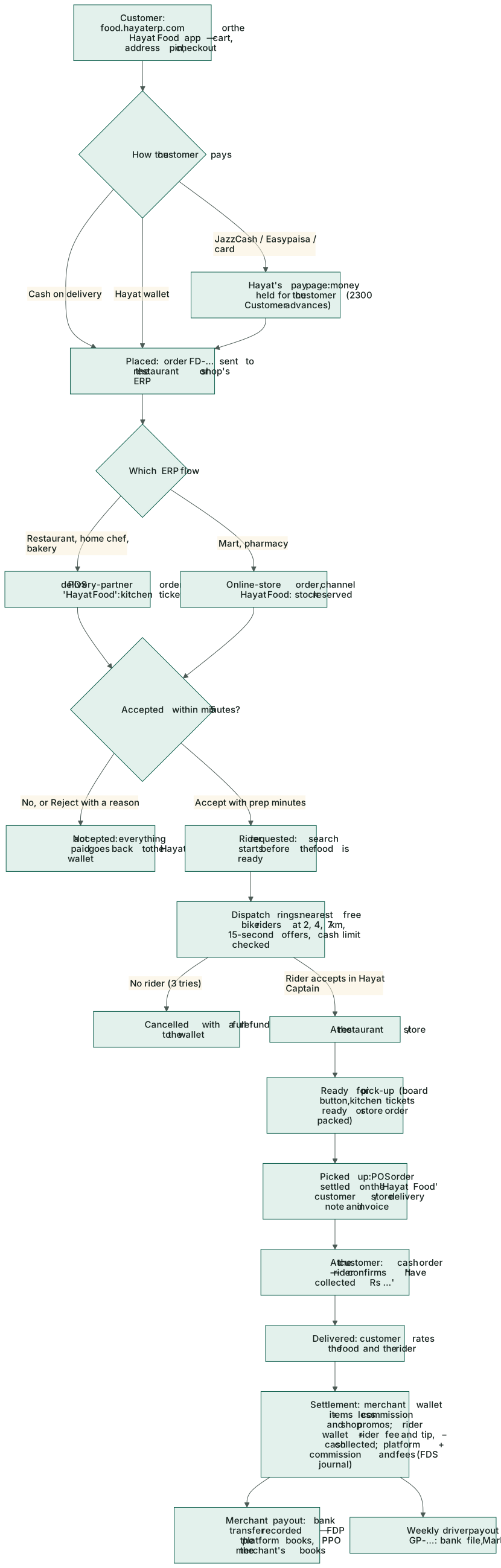
Where the money goes
Customers pay Hayat (cash to the driver, the Hayat wallet, or the platform's pay page). On every delivered job the wallets move: the customer pays, the merchant is credited its net, the driver their earning less the cash they collected, and Hayat its commission and fees. Merchants are paid when a payout is recorded, drivers in the weekly batch; drivers hand in cash they owe. Everything is posted to the platform tenant's books as above, and each merchant's own books get the sale and the payout (see Selling on Hayat Food → Where the money goes).