
Ordering on Hayat Food
food.hayaterp.com ↗Hayat Food at food.hayaterp.com and in the Hayat Food app — order food from restaurants and home chefs, and groceries and medicines from marts and pharmacies near you: delivery location, search, the menu, checkout with cash, the Hayat wallet or JazzCash / Easypaisa / card, live tracking, cancelling, help and refunds, reviews and the wallet.
Hayat Food delivers from restaurants, home chefs, bakeries, marts and pharmacies that run on Hayat ERP. You order on food.hayaterp.com or in the Hayat Food app, a Hayat rider picks the order up and brings it to your door, and you follow the rider on the map. Prices are in rupees (Rs).
Who does what
| Who | Where | Does |
|---|---|---|
| Customer | food.hayaterp.com, the Hayat Food app | Sets the delivery location, orders, pays, tracks, cancels early, asks for help, rates. |
| Restaurant or shop (a Hayat business) | hayaterp.com → Hayat Food | Its menu or products, prices, hours; accepts, prepares and hands over orders. See Selling on Hayat Food. |
| Rider | the Hayat Captain app | Picks up and delivers; collects the cash of cash orders. |
| Hayat team | admin.hayaterp.com → Hayat Food | Approves shops, sets fees and commission, handles disputes and refunds. See Running Hayat Food and Hayat Ride. |
Set your delivery location
The first time, press Set my delivery location (or Deliver to in the header). The Delivery location sheet opens:
- Use my current location, or drag the map so the pin is on your building — Drag the map so the pin is on your building. The rider uses this pin.
- Type House / flat, street (needed), Area, City (picked from the pin, you can change it) and a Nearby landmark.
- Choose Home, Work or Other, tick Save to my addresses if you are signed in, and press Deliver here.
There is no address search: the pin carries the exact point and your words help the rider. Signed in, your Saved addresses are listed at the top of the sheet. The location is kept on this device; every list, fee and time on the site is for that point.
Find food, groceries and medicines
The home page has three tabs: Food, Groceries and Pharmacy.
- Food shows the banners, What are you craving? (cuisine circles that open a search), and rails such as order again, featured, near you, deals, top rated and home chefs — each with See all.
- Groceries and Pharmacy list the marts and pharmacies that deliver to you, with their category chips.
- When nobody delivers to your point you see No restaurants deliver here yet with Change location.
Search (Search dishes, restaurants, shops) finds places and the dishes that match. Spelling does not matter much — “biryani”, “biriyani” and “بریانی” all work — and Roman Urdu is understood. Under each place the matching dishes are listed; tapping one opens the menu with that dish.
| Filter or sort | Shows |
|---|---|
| All, Restaurants, Home chefs, Groceries, Pharmacy, Bakery | One kind of place |
| Open now, Free delivery, Deals, Under 30 min | Only places that are |
| Sort: Best match, Nearest, Top rated, Fastest, Lowest minimum | The order of the results |
Open places come first. More results load with Show more. The filters are part of the page address, so a link you share opens the same results.
The menu
A restaurant or shop page shows its cover and logo, rating, and whether it is Open now, Busy — longer wait or Closed (with when it opens), then:
| Fact | Means |
|---|---|
| Delivery time | About how long from ordering to your door. |
| Delivery fee | For your location (by distance; Free during a free-delivery offer). |
| Minimum order | The smallest items total the place takes. |
| Distance | From the place to your pin. |
A place too far away says Your address is outside this place's delivery area with Change address; a place without cash on delivery says This place takes wallet or online payment only.
The tabs are Menu (Products for a shop), Reviews and Info (about, opening hours in Pakistan time, how far it delivers). In the menu use Search the menu and the section chips; Popular dishes come first. Sold out items cannot be added; Few left means low stock.
- A dish without choices: + adds it at once.
- A dish with choices opens a sheet: each group says Required or Optional, up to n; pick the choices (a sold-out choice is greyed), set the quantity, add Special instructions (e.g. less spicy, no onion) and press Add to cart. The price follows your choices.
The bar at the bottom shows View cart with the count and total.
Your cart
Each restaurant or shop has its own cart — one order goes to one place. On the website Your carts lists every cart you started on this device; in the app the cart holds one place at a time and asks Start a new cart? before you add from another. Change quantities with Less / More or Remove, then Checkout.
Checkout
- Sign in with your mobile number and the 6-digit code (see Your account).
- Delivery address: Change or Set delivery address opens the location sheet. Check Name and Phone for the rider, and add a Note for the rider (e.g. ring the bell, 2nd floor, gate code).
- Your order: the lines, Add more items and a Note for the restaurant (Cutlery, allergies, packing…).
- When: As soon as possible, or Schedule and pick a time under Deliver at (half-hour slots over the next days, at least 30 minutes ahead and while the place is open).
- Payment: Cash on delivery, Hayat wallet (with your balance) or JazzCash / Easypaisa / card. A method that cannot be used for this order is greyed with the reason.
- Promo code → Apply (the offers that apply are shown too), and Tip your rider — 100% goes to the rider (No tip, Rs 30, 50, 100 or 150).
- Check the Summary and press Place order (or Continue to payment for online payment).
The summary is worked out again on every change:
| Line | What it is |
|---|---|
| Items | Your items with their choices. |
| Discount | The promo code or automatic offer. |
| Delivery fee | By distance from the place to your pin (a set fee when distance cannot be worked out); Free with a free-delivery offer. |
| Service fee | A percentage set by Hayat, between a minimum and a maximum (often 0). |
| Small order fee | Added when the items are under a set amount (Rs 50 under Rs 300 at the start). |
| Rider tip | All of it goes to your rider. |
| Total | What you pay. |
Checkout stops with the reason when something is wrong — for example The minimum order at … is PKR …, … does not deliver to this address, … is closed. It opens … — schedule your order for then., Schedule at least 30 minutes ahead. or This promo code is not valid here. Pressing Place order twice never makes two orders.
How you pay
| Method | What happens |
|---|---|
| Cash on delivery | Pay the rider at the door; keep the exact amount ready. Not offered above Hayat's largest cash order (Rs 10,000 at the start) or by places that take only prepaid orders. |
| Hayat wallet | The whole total is taken from your wallet when you order; the balance must cover it (top up first). |
| JazzCash / Easypaisa / card | Hayat's secure pay page opens. The restaurant gets your order once it is paid; unpaid orders are cancelled after 30 minutes. If you closed the page, press Pay now on the order. |
Track your order
After ordering you see Thank you! Your order is placed. The order page shows Arriving by with the minutes left, Order progress with the times, the map with your address and the rider's live position, the rider's name and vehicle, the items and money, and the payment. With Live updates on it changes by itself; otherwise it refreshes every few seconds.
| Status | Means |
|---|---|
| Waiting for payment | An online order not paid yet — Pay now. |
| Scheduled | It is sent to the place in time for your chosen slot. |
| Order placed | The place has it and must accept within about 5 minutes, or it is not accepted and refunded. |
| Accepted / Preparing | The place is making it; a rider is found before it is ready. |
| Ready for pick-up | Packed, waiting for the rider. |
| On the way | The rider has it. |
| Delivered | Done — rate it. |
| Rejected / Cancelled | With the reason (The restaurant could not take it: …) and what was refunded to your wallet. |
Share tracking copies a link anyone can open. If no rider can be found after several tries the order is cancelled and everything paid goes back to your wallet.
Cancel an order
Press Cancel order while the place has not accepted it yet, choose Why are you cancelling? and Yes, cancel. Money you paid goes back to your Hayat wallet at once and a promo code you used is freed. After the place accepts, use Get help instead.
Get help and refunds
Within 7 days of an order press Get help on it:
- Choose What went wrong?: An item is missing, Wrong item, Food quality, Very late, Not delivered, Payment problem, Rider behaviour or Something else.
- For items, tick which ones; then Tell us more and, if you like, the Refund you are asking for (optional).
- Press Send to Hayat Food support.
Help & refunds (in the account menu) lists your requests with their status — Open, Refunded, Rejected or Closed — the amount refunded to your wallet and Hayat's answer. Approved refunds go to your Hayat wallet.
Rate and order again
Once an order is delivered, How was it? asks for the Food rating, the Rider stars, tags such as Tasty or Arrived hot, and Anything to add? (optional) — Send review, once per order. Your first name and words show on the place's Reviews tab, where the place can reply.
Order again puts the same items back in the cart and lists any that are Not available now.
The Hayat wallet
Hayat wallet shows the Balance, any Unpaid ride fee from Hayat Ride and the History of movements (food orders, refunds, rides, parcels, top-ups). Pay for food and rides in one tap. Refunds land here.
To add money, type the Amount under Add money and press Top up: Hayat's pay page opens (JazzCash, Easypaisa, debit / credit card). After paying, come back here and tap “Check again” — the page then says Top-up received. Top-ups are from Rs 100 to Rs 50,000.
Your account
There is no password. Type your Mobile number, Send code, then the 6-digit code from the SMS — One account for Hayat Food and Hayat Ride. A new number gets an account at once (add Your name). My account has your Profile (name, email, language), Saved addresses (Add, Edit, Make default, Delete, Deliver here), My orders, Wallet, Help requests and Sign out.
اردو / EN in the header switches the whole site to Urdu (right to left) and saves the choice on your account.
The Hayat Food app
The Hayat Food app (Android and iPhone) is the same service: tabs Food, Shops, Orders and Account; the Deliver to card at the top (current location, Pick on the map, saved places); search with Open now, Free delivery, Deals and Rating 4+; the menu and options; the cart with offers, promo code and Tip for the rider; checkout; the live order (steps Placed → Accepted → Cooking → On the way → Delivered) with Pay now, Rate, Order again, Get help and Cancel order; Hayat wallet, Saved places, Help requests, Offers and Language under Account. Online payments and top-ups open in a browser tab and the app reads the order again when you come back. Sign in once in each app (the account is the same).
See Mobile apps.
Workflow
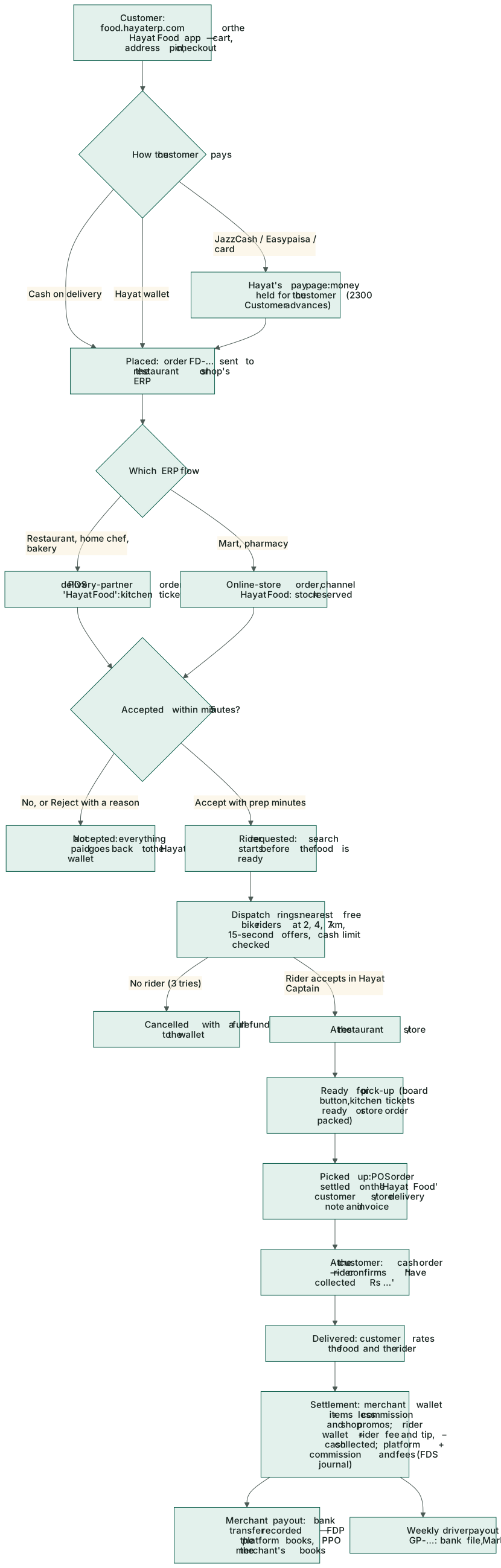
- Set the location, choose a place, fill the cart.
- Check out with cash, wallet or online payment.
- The place accepts and prepares; a rider is found and picks it up.
- Follow the rider; pay cash at the door if you chose it; rate.
Where the money goes
You pay Hayat Food (cash to the rider, your Hayat wallet or Hayat's pay page). When the order is delivered Hayat pays the place its items less Hayat's commission, and the rider their fee and your tip, through their weekly payouts. Refunds come from Hayat into your Hayat wallet. This is different from Hayat Bazaar, where each shop is paid directly.